


 By
By Personal computing hardware has evolved through distinct technological leaps: the shift from command-line interfaces to graphical operating systems, the transition from standalone desktop towers to connected mobile notebooks, and the move from spinning hard disk drives to flash-based solid-state storage.
Today, computing is undergoing its most significant structural architectural change in twenty years. Silicon manufacturers and operating system developers are heavily marketing the AI PC.
Stickers and marketing badges highlighting specialized neural silicon are appearing across ultrabooks, convertibles, and workstations. But what separates an authentic AI computer from marketing hype? Does simply running a cloud-based chatbot in a browser make a computer an “AI PC”?
The short answer is no.
A true AI PC is defined by an architectural transformation of the silicon inside: the integration of a dedicated Neural Processing Unit (NPU), unified system memory hierarchies, and local operating system frameworks capable of executing continuous, low-latency, and privacy-preserving machine learning tasks directly on the device.
1. What Is an AI PC? Moving Beyond the Marketing Label
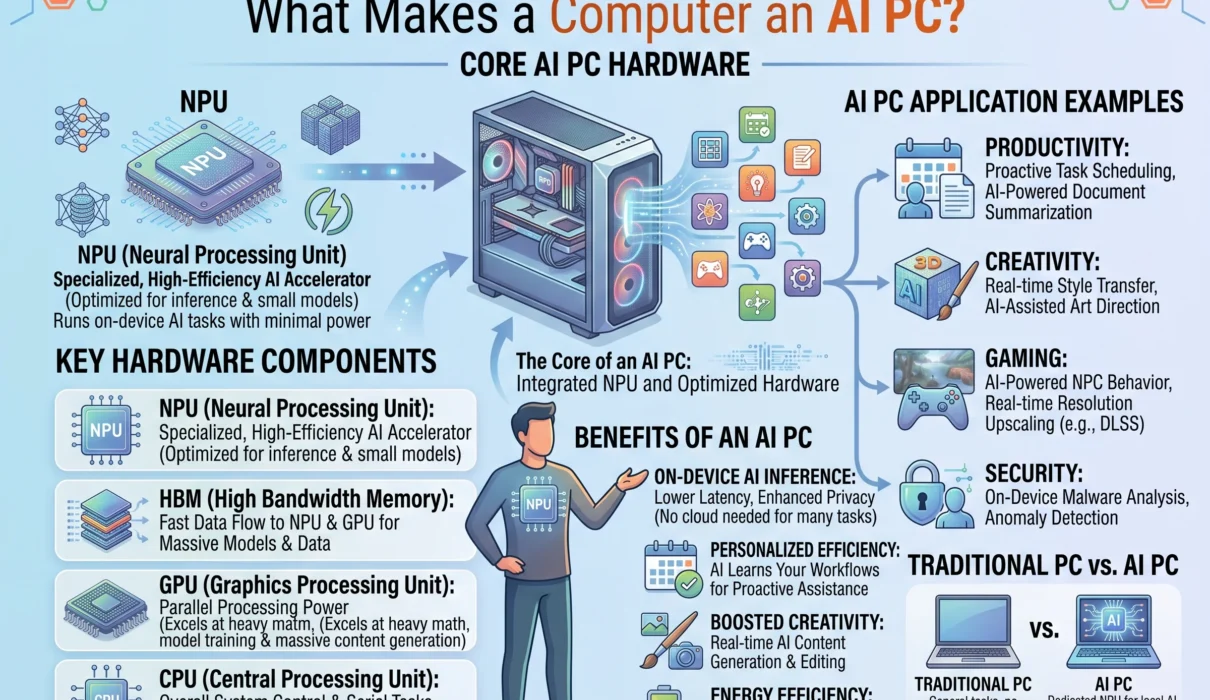
An AI PC (or AI laptop) is a personal computer equipped with dedicated neural acceleration hardware—most notably an NPU alongside a modern CPU and GPU—designed to process machine learning workloads locally without relying on remote cloud data centers.
TRADITIONAL PC COMPUTING vs. AI PC ARCHITECTURE

Traditional PC:
[User Interaction] ──► [Central Processing Unit (CPU)] ──► Local Output
                       [Graphics Processing Unit (GPU)]
                         ▲
                         │ (Web Request via Cloud API)
                         ▼
                       [Remote Hyperscale Server Farm]

AI PC (Copilot+ / Modern SoC Standard):
[User Interaction] ──► [Tri-Core Heterogeneous Processor]
                         ├─► CPU: Sequential Logic & App OS
                         ├─► GPU: High-Throughput Graphics & Batch Math
                         └─► NPU: Dedicated 40+ TOPS Low-Power Neural Engine
                                   │
                                   ▼
                       [Local Neural Processing Runtime]
                       • Zero data egress
                       • Sub-15ms execution latency
                       • Operates fully air-gapped / offline
For the first two years of the generative artificial intelligence boom, nearly all consumer AI interactions were cloud-bound. Whether you asked a system to summarize a technical PDF, write an email draft, or generate an image, the processing pipeline was identical:
- Your raw text, audio, or image was digitized locally.
- It traveled over your local network and internet service provider across miles of fiber-optic cables.
- A hyperscale cloud facility ingested your query into power-hungry enterprise GPUs running inside massive server racks.
- The generated tokens or pixels were transmitted back to your machine’s screen.
While effective for demonstrations and non-urgent creative requests, this cloud-dependent framework has critical drawbacks: network latency, vulnerability of private data, recurring operational API expenses, and complete dependency on an active internet connection.
An AI PC changes this balance. Instead of sending data to the cloud, it brings the model to the data. The compute engine lives directly on your motherboard, executing background vision models, real-time audio translation, contextual operating system indexing, and Small Language Models (SLMs) locally.
2. The Hardware Foundation: The NPU and Heterogeneous Processing
To understand what makes an AI PC unique, you must look at how silicon architecture has adapted.
In a traditional computer, two processors divide all computing labor:
- The CPU (Central Processing Unit): A small cluster of powerful cores running at high clock speeds (3.5 GHz to 5.0+ GHz). It handles sequential logic, system operations, and rapid single-threaded tasks.
- The GPU (Graphics Processing Unit): Thousands of smaller, parallel processing cores designed for 3D graphics rendering, video encoding, and heavy vector calculations.
┌────────────────────────────────────────────────────────────────────────┐
│                   HETEROGENEOUS SYSTEM-ON-CHIP (SoC)                   │
├────────────────────┬────────────────────┬──────────────────────────────┤
│        CPU         │        GPU         │             NPU              │
│  Sequential logic, │ Complex 3D gaming, │ Ultra-efficient, sustained   │
│  app initialization│ video timeline     │ tensor mathematics, matrix   │
│  & OS scheduling   │ rendering, 3D math │ convolutions, INT4/INT8 math │
├────────────────────┴────────────────────┴──────────────────────────────┤
│                   UNIFIED MEMORY ARCHITECTURE (UMA)                    │
│        Shared low-latency, high-bandwidth memory fabric (16GB–64GB)    │
└────────────────────────────────────────────────────────────────────────┘
When deep neural networks are executed continuously on a conventional CPU, the processor struggles because sequential architectures are poorly matched to high-volume matrix operations.
When those same models run on a discrete GPU, performance is fast, but the power draw is unsustainable for mobile devices—often pulling 50W to 150W+, spinning fans up to maximum speeds, and depleting laptop batteries in under an hour.
The NPU (Neural Processing Unit) resolves this dilemma.
The Mechanics of an NPU
An NPU is an application-specific integrated circuit (ASIC) designed specifically to execute the mathematical primitives of deep learning: multidimensional matrix multiplications, convolutions, and non-linear activation functions.
Instead of using traditional compute registers that require shuttling data back and forth to system memory, NPUs typically rely on systolic arrays and fixed tensor engines. Data streams directly from one calculating cell to the next without repeated memory reads and writes, minimizing electrical resistance and power draw.
Furthermore, NPUs are optimized for low-precision quantization:
- While training neural networks requires 16-bit or 32-bit floating-point math (FP16, FP32), running an already-trained model (inference) can be executed using 8-bit (INT8) or 4-bit (INT4) integer arithmetic.
- NPUs process these reduced-precision integers natively, achieving high throughput within an ultra-low thermal envelope—drawing just 2 to 10 watts under load.
Understanding TOPS: The Measuring Stick of the AI PC
NPU throughput is quantified in TOPS (Tera Operations Per Second—trillions of operations per second).
For a computer to be formally certified under modern enterprise and consumer standards (such as Microsoft’s Copilot+ PC specification), the system must feature an NPU capable of delivering at least 40 TOPS of dedicated performance:
| System Architecture | Silicon Examples | NPU Rating | Certified Copilot+ Tier |
| Legacy / 1st Gen AI PC | Intel Core Ultra Series 1 (Meteor Lake) | ~10–11 TOPS | No (Sub-threshold) |
| Legacy Mobile AI | AMD Ryzen 7040 / 8040 Series | ~10–16 TOPS | No (Sub-threshold) |
| Modern Arm AI PC | Qualcomm Snapdragon X Elite / X Plus | 45 TOPS | Yes (Fully Certified) |
| Modern x86 AI PC | Intel Core Ultra Series 2 (Lunar Lake) | 47–48 TOPS | Yes (Fully Certified) |
| Modern x86 AI PC | AMD Ryzen AI 300 Series (Strix Point) | 50–55 TOPS | Yes (Fully Certified) |
| Apple Silicon Platform | Apple M3 / M4 Series Neural Engine | 18–38 TOPS | Apple Intelligence Native |
Reaching this 40+ TOPS threshold is critical: it guarantees the operating system can run multiple machine learning models simultaneously in the background without stealing cycles from the CPU or starving the GPU of graphical resources.
3. The Memory Equation: Why RAM Is Critical for Local AI
One of the most common points of confusion when evaluating an NPU laptop is the assumption that the processor is the only spec that matters.
In local artificial intelligence, system memory capacity and memory bandwidth are just as important as NPU TOPS.
                     THE UNIFIED MEMORY AI BOTTLENECK

  7B Parameter Small Language Model (Quantized to INT4):
  ┌────────────────────────────────────────────────────────┐
  │  Base Model Footprint: ~4.2 Gigabytes of RAM           │
  ├────────────────────────────────────────────────────────┤
  │  KV Context Cache (8k Context Window): ~1.2 GB         │
  ├────────────────────────────────────────────────────────┤
  │  Windows 11 / macOS Operating System Baseline: ~5.0 GB │
  ├────────────────────────────────────────────────────────┤
  │  Active Applications (Browser with 20 tabs): ~4.5 GB   │
  └────────────────────────────────────────────────────────┘
  Total Baseline Required: ~14.9 GB of RAM (Exhausts an 8GB machine completely)
In modern AI PC architectures, the CPU, GPU, and NPU share a Unified Memory Architecture (UMA). There is no separate VRAM card for on-device AI tasks; all processors read from and write to the same central pool of high-speed system RAM (such as LPDDR5X).
This shared memory structure introduces two key hardware considerations:
1. The 16GB Absolute Minimum Threshold
A standard laptop running basic office suites and a web browser can function adequately on 8GB of RAM. An AI PC cannot.
When you load a local Small Language Model (like Microsoft’s Phi-3, Meta’s Llama 3 8B, or Google’s Gemma 2) into system memory, that model claims 4GB to 6GB of RAM permanently. If your computer only has 8GB of total memory, the operating system is forced to swap memory blocks onto the storage drive (SSD), which degrades overall system performance.
Because of this, modern AI PC certification guidelines mandate a minimum of 16GB of unified memory, with 32GB recommended for power users running concurrent local models.
2. Memory Bandwidth Constraints
When an LLM or SLM generates text, it is “autoregressive”—meaning it predicts output one word or token at a time. To generate a single token, the processor must read every single parameter of the model out of system RAM.
Even if an NPU can compute 50 trillion operations per second, its effective token output speed will be throttled if the system memory bus can only supply data at 40 or 50 GB/s. AI laptops use wide memory buses and high-speed LPDDR5X memory to push bandwidth between 85 GB/s and 130+ GB/s, keeping the neural processing pipelines continuously saturated with data.
4. Local AI Processing vs. Cloud AI: The Four Core Advantages
Why invest in specialized local hardware when cloud-based AI systems like ChatGPT, Claude, and Midjourney are readily available over the internet?
The answer lies in four practical advantages: latency, privacy, cost, and continuity.
┌────────────────────────────────────────────────────────────────────────┐
│                   LOCAL AI vs. CLOUD-HOSTED AI                         │
├────────────────────┬────────────────────┬──────────────────────────────┤
│ Operational Vector │ Local AI PC        │ Centralized Cloud AI         │
├────────────────────┼────────────────────┼──────────────────────────────┤
│ Latency Profile    │ Immediate (<15ms), │ High variance (300ms–2000ms),│
│                    │ deterministic      │ subject to network traffic   │
├────────────────────┼────────────────────┼──────────────────────────────┤
│ Privacy & Security │ Zero-trust native; │ Data transmitted to remote   │
│                    │ zero data egress   │ third-party cloud servers    │
├────────────────────┼────────────────────┼──────────────────────────────┤
│ Marginal Cost      │ $0.00 per query;   │ Usage-based API fees or      │
│                    │ no subscriptions   │ recurring monthly charges    │
├────────────────────┼────────────────────┼──────────────────────────────┤
│ Offline Continuity │ 100% operational   │ Fails completely without     │
│                    │ while air-gapped   │ active internet connection   │
└────────────────────┴────────────────────┴──────────────────────────────┘
1. Deterministic Low Latency
Sending an audio stream to a remote server, waiting for transcription, and receiving the response introduces round-trip network delays ranging from 300 milliseconds to two full seconds. For conversational typing, that delay is noticeable; for real-world interface interactions—such as eye-tracking adjustments, real-time noise cancellation, or live UI assistance—it is unusable.
An AI PC executes inferences on-die, delivering real-time responses with zero network jitter.
2. Zero-Trust Local Data Privacy
Data sovereignty is the primary reason enterprises and security-conscious professionals are prioritizing on-device processing.
When you run machine learning workloads locally, confidential source code, legal contracts, proprietary customer records, and medical files never leave your device’s memory bus. You remain fully compliant with data protection regulations (such as GDPR, HIPAA, and CCPA) because no third party ever ingests, caches, or trains on your information.
3. Economics: Ending the Per-Token Cloud Tax
Every interaction with a cloud-hosted artificial intelligence platform carries an infrastructure cost. Hyperscalers charge subscriptions ($20 to $30 per user monthly) or meter usage through API token fees.
For an enterprise with 10,000 employees, running basic operational tasks through cloud AI APIs represents an ongoing operational expense. An AI PC shifts these everyday tasks—such as text drafting, summarization, and data categorization—onto existing client silicon, reducing ongoing cloud compute expenses to zero.
4. Continuous Offline Functionality
Laptops are mobile by design. Professionals frequently work on airplanes, commuter trains, and in remote locations with intermittent or non-existent connectivity. An AI PC ensures that your voice transcription, search capabilities, creative tools, and local knowledge base remain fully operational even when completely disconnected from the internet.
5. Copilot-Style Features: What Does an AI PC Actually Do Today?
A common criticism of early AI computers was that software features lagged behind the silicon capabilities. Today, operating systems and creative software suites have deployed concrete, practical tools that run directly on local NPUs.
                     ON-DEVICE OPERATING SYSTEM PIPELINE

  [Webcam / Microphone] ──► [Local NPU] ──► Low-Power Noise Suppression & Eye-Contact
  [Active Screen Data]  ──► [Local NPU] ──► Semantic Document Parsing & Recall Index
  [Live Audio Stream]   ──► [Local NPU] ──► Real-Time Multi-Language Translation
  [Digital Inking]      ──► [Local NPU] ──► Vector Diffusion & Cocreator Sketching
Windows Studio Effects
One of the most widely used local AI features runs quietly in the background during video conferences. The NPU handles complex video and audio pipelines simultaneously:
- Background Blurring & Depth Segmentation: Distinguishing between fine strands of hair, clothing borders, and background objects at 30 to 60 frames per second without stuttering.
- Gaze Correction: Adjusting eye positioning in real time to make it appear as though you are looking directly into the camera lens, even while reading notes on your display.
- Voice Focus & Acoustic Shielding: Stripping away barking dogs, mechanical keyboard clicks, and HVAC rumble from your microphone audio using lightweight neural audio filters.
- Power Savings: Executing these tasks on an NPU consumes roughly one-tenth of the power required to run them on a CPU or GPU, keeping your laptop cool and quiet during long calls.
Real-Time Live Captions and Translation
Modern AI PCs process any audio passing through the operating system—whether from a video conference, a downloaded podcast, or a live video stream—and generate real-time captions locally.
More impressively, the NPU can translate more than 40 languages into native English in real time without passing any audio data through remote servers.
Semantic Search and Retrospective Indexing (Recall Architecture)
Traditional desktop search indexes files based on explicit metadata: file names, folder paths, and exact text matches.
AI PCs use semantic indexing:
- Modern tools take encrypted, low-resolution snapshots of your active windows every few seconds.
- An on-device vision-language model parses the contents of the screen, extracting text, identifying diagrams, and categorizing application states.
- It indexes these snapshots as vector embeddings stored locally inside a secured SQLite database.
- When you need to retrieve lost work, you simply search conversational concepts: “Find that blue chart comparing quarterly churn rates that my manager shared on Slack three weeks ago.” The system surfaces the exact moment you viewed that asset, regardless of whether you saved the source file.
Local Creative Generation (Cocreator and Live Diffusion)
In creative applications like Microsoft Paint or professional photo editing software, NPUs power real-time sketching tools. As you draw basic vector lines with a stylus, an on-device diffusion model interprets your rough brushstrokes alongside a text prompt, rendering high-resolution concept art in real time as your pen moves across the screen.
6. Privacy and the Zero-Trust Architecture of Local Silicon
As operating systems integrate deeper into our workflows, user data security has become an urgent concern.
The idea of a computer constantly watching user actions, taking desktop snapshots, and reading screen contents naturally raises privacy questions. Without clear architectural boundaries, such capabilities would represent an unacceptable security risk.
                      THE SECURE ENCLAVE ISOLATION MODEL

  ┌────────────────────────────────────────────────────────┐
  │ SECURE ENCLAVE HARDWARE PERIMETER                      │
  │                                                        │
  │  [Microscopic Screen Capture] ──► [BitLocker Encryption│
  │                                   with TPM 2.0 Key]    │
  │                                           │            │
  │  [Vector Semantic Embeddings] ◄───────────┘            │
  │               │                                        │
  │               ▼                                        │
  │  [Zero-Cloud Local SQLite Storage Database]            │
  │                                                        │
  │  ❌ OUTBOUND NETWORK CONNECTION ATTEMPTS ARE BLOCKED   │
  └────────────────────────────────────────────────────────┘
To resolve this concern, modern AI laptops isolate intelligent features using Zero-Trust hardware design:
1. Hardware-Backed Encryption via TPM 2.0 and Pluton
Local semantic databases and screen snapshots are encrypted with hardware-bound keys generated inside the system’s Trusted Platform Module (TPM) or Microsoft Pluton security processor. This data is tied strictly to your user profile and biometrics (Windows Hello or Apple Touch ID).
Even if an attacker gains physical possession of your laptop’s SSD, the underlying AI indexes cannot be decrypted or read on another machine.
2. Network Isolation and Sandboxing
On-device models run within sandboxed operating system processes that lack network access permissions. The neural network that transcribes your private phone calls or indexes your open browser tabs is physically barred by the operating system kernel from opening outbound network sockets.
Your personal data remains strictly inside the boundaries of your local silicon.
7. The Silicon Battleground: Arm vs. x86 in the AI Era
The rise of the AI PC has reignited the architectural rivalry between Arm and x86 processor instruction sets.
┌────────────────────────────────────────────────────────────────────────┐
│                   THE AI SILICON COMPARISON                            │
├─────────────────────┬────────────────────┬─────────────────────────────┤
│ Platform Category   │ Architecture Basis │ Market Strategy & Profile   │
├─────────────────────┼────────────────────┼─────────────────────────────┤
│ Qualcomm Snapdragon │ Arm64 Architecture │ Unrivaled battery longevity │
│ X Elite & X Plus    │ (SoC Packaging)    │ and class-leading thermal   │
│                     │                    │ efficiency under mobile use │
├─────────────────────┼────────────────────┼─────────────────────────────┤
│ Intel Core Ultra    │ x86 Architecture   │ Complete backwards-legacy   │
│ Series 2            │ (Lunar Lake Tiles) │ software compatibility with │
│                     │                    │ specialized low-power tiles │
├─────────────────────┼────────────────────┼─────────────────────────────┤
│ AMD Ryzen AI        │ x86 Architecture   │ Exceptional multi-threaded  │
│ 300 Series          │ (Strix Point Zen 5)│ computing paired with high  │
│                     │                    │ peak NPU TOPS output        │
└─────────────────────┴────────────────────┴─────────────────────────────┘
The Arm Disruption: Qualcomm Snapdragon X Platforms
For years, Windows laptops were tethered almost exclusively to traditional x86 architecture. The arrival of Qualcomm’s Snapdragon X series changed that balance.
By using custom Arm64 cores paired with an integrated 45-TOPS NPU, these systems introduced battery efficiency and thermal management comparable to Apple silicon. Users can run intensive on-device neural workloads while enjoying genuine multi-day battery life on a single charge.
The x86 Counterattack: Intel Lunar Lake and AMD Zen 5
Legacy chipmakers responded quickly. Intel re-engineered its mobile processors with its Core Ultra Series 2 (Lunar Lake) platform, removing hyper-threading in favor of high-efficiency low-power islands, moving system RAM directly onto the processor packaging, and integrating an NPU delivering up to 48 TOPS.
Concurrently, AMD debuted its Ryzen AI 300 series chips, delivering up to 50–55 NPU TOPS alongside raw multi-threaded computing power.
The primary advantage for the x86 camp remains universal software compatibility. While Windows on Arm uses an emulation translation layer (Prism) to run legacy 32-bit and 64-bit software, Intel and AMD platforms run decades of legacy enterprise software, specialized drivers, and anti-cheat gaming engines natively with zero translation overhead.
8. What Does the Future Hold for AI Computers?
The current generation of AI PCs is just the starting point. As Small Language Models improve and developers optimize software for local NPUs, personal computing will evolve in several key areas:
                    THE EVOLUTION OF PC INTERACTION

  1980s – 2020s: Command-and-Control Paradigm
  [User clicks static menus, manages folder trees, configures file formats]

  Present Era: Co-Pilot Assistant Paradigm
  [User asks assistant to draft an email, summarize a PDF, or adjust an image]

  Future Era: Autonomous Local Agent Paradigm
  [User assigns high-level goals; local models plan, navigate, and execute]
1. Truly Agentic Personal Computing
Rather than acting as simple chat interfaces, future operating systems will operate as autonomous digital agents.
Because an AI PC has continuous, zero-latency access to your desktop context, you can assign high-level, cross-application directives: “Review my inbox for invoices from the past month, cross-reference them against my expense sheet in Excel, highlight discrepancies, and draft an approval email to the finance team.” The system will orchestrate the workflow across your applications locally, presenting you with the finished result for final approval.
2. Multi-Modal “Computer Use”
Future local models will perceive personal computers much like humans do. Using real-time visual parsing of the desktop display paired with OS-level automation hooks, local agents will navigate software that lacks public APIs—clicking buttons, navigating complex dashboards, and extracting data from legacy software interfaces without requiring manual programming.
3. Open-Source Ecosystems and Local LLMs
The open-source AI community is optimizing models to run directly on consumer-grade hardware. Frameworks like Ollama, llama.cpp, and LM Studio make it easy for developers, privacy advocates, and enthusiasts to run open-weight models (such as Mistral, Llama, and DeepSeek) locally on modern AI laptops.
As NPUs gain broader support across open-source runtimes (via standards like ONNX Runtime, DirectML, and OpenVINO), running private models locally will become as straightforward as launching a standard desktop application.
The Verdict: Do You Need an AI PC Today?
If you are evaluating the personal computing landscape, you may wonder: Is buying an AI PC truly necessary right now?
PURCHASE EVALUATION MATRIX

Are you buying a new laptop meant to last the next 3 to 5 years?
 ├── YES ──► Prioritize an AI PC with a 40+ TOPS NPU and at least 16GB RAM.
 │           Operating system features and creative software updates will
 │           increasingly target this hardware baseline.
 │
 └── NO  ──► If your current PC functions well and your daily routine is
             centered on web browsing and standard document editing,
             there is no need to upgrade immediately. Cloud tools can
             bridge your AI needs for now.
While you do not need to discard a perfectly functional laptop solely to gain an NPU, the direction of the computing industry is clear. Operating systems, enterprise software platforms, and creative applications are being built around local neural acceleration.
Buying an AI PC with a certified 40+ TOPS NPU and at least 16GB of unified memory is not about chasing a marketing buzzword—it is about future-proofing your workflow. It ensures that as software shifts toward autonomous agents, semantic system search, and real-time processing, your computer has the silicon architecture needed to run those tools smoothly, efficiently, and securely.
The era of computing defined solely by clock speeds and core counts is behind us. The future of the personal computer belongs to balanced, heterogeneous machines: systems that use the CPU to manage logic, the GPU to render rich visual worlds, and the NPU to bring intelligent computing directly to your fingertips.
