

 By
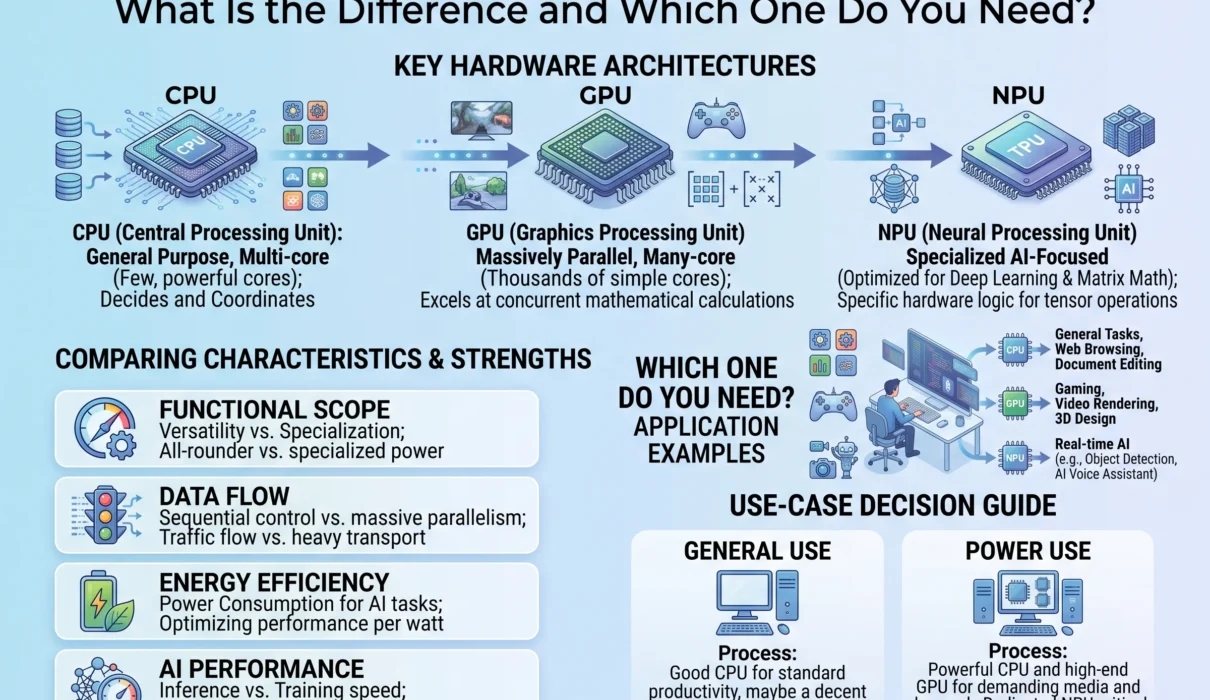
By Buying a computer, smartphone, or workstation used to mean looking at two core components: the Central Processing Unit (CPU) and the Graphics Processing Unit (GPU). If you wanted general performance, you bought a faster CPU; if you wanted 3D gaming or video editing, you invested in a discrete GPU.
The rise of generative models and local machine learning has upended that paradigm. Today, product spec sheets spotlight another piece of silicon: the Neural Processing Unit (NPU). Major operating systems now set explicit hardware baselines for local AI processor throughput, and silicon vendors package CPUs, GPUs, and NPUs onto a single system-on-chip (SoC).
Understanding the CPU vs GPU vs NPU debate is no longer just for semiconductor engineers. Whether you are building an enterprise machine learning pipeline, buying an everyday laptop, or configuring a creative workstation, knowing what each chip does—and where its limitations lie—ensures you spend your hardware budget effectively.
THE PROCESSOR SPECTRUM AT A GLANCE
┌────────────────────────────────────────────────────────────────────────┐
│ CPU (Generalist)      GPU (Parallel Workhorse)    NPU (Specialist)     │
│ • Few powerful cores  • Thousands of tiny cores   • Fixed tensor array │
│ • Low latency (GHz)   • High memory bandwidth     • Low precision math │
│ • Sequential tasks    • Massive matrix math       • 2W–15W efficiency  │
└────────────────────────────────────────────────────────────────────────┘
1. The Core Mechanical Differences
To compare these processors, we must look at how each handles instructions. Software execution falls into two primary patterns: sequential latency-sensitive compute and parallel throughput-oriented compute.
SEQUENTIAL vs. PARALLEL vs. TENSOR EXECUTION

CPU (Sequential Execution):
Task A ──► Task B ──► Task C ──► Task D (Fast pipeline, high clock speed)

GPU (Parallel Execution):
Task A1 ──► [ Core 1 ] ──┐
Task A2 ──► [ Core 2 ] ──┼──► Bulk Output (Simultaneous calculation across
Task A3 ──► [ Core 3 ] ──┤     thousands of small vector cores)
Task A4 ──► [ Core 4 ] ──┘

NPU (Systolic Tensor Stream):
Input Vector ──► [MAC] ──► [MAC] ──► [MAC] ──► Direct Inference Matrix
                  ▲         ▲         ▲
               Weight 1  Weight 2  Weight 3
               (Data flows without register round-trips; ultra-low power)
- CPUs are designed to move through unpredictable, branch-heavy instructions as quickly as possible. They minimize execution latency for single-threaded tasks.
- GPUs are designed to perform identical mathematical operations across massive arrays of data simultaneously. They maximize throughput over individual task speed.
- NPUs are domain-specific accelerators designed around the mathematics of artificial neural networks: multi-dimensional matrix multiplications, convolutions, and non-linear activation functions executed at reduced numerical precision.
2. What Is a CPU and What Does It Do Best?
The Central Processing Unit (CPU) is the general-purpose coordinator of any computer system. Every click, network request, file read, and operating system instruction routes through the CPU.
┌────────────────────────────────────────────────────────┐
│                 TYPICAL CPU CORE DESIGN                │
├────────────────────────────────────────────────────────┤
│  Branch Predictor & Out-of-Order Execution Logic       │
├──────────────┬──────────────┬──────────────┬───────────┤
│ ALU (Math)   │ ALU (Math)   │ Load / Store │ Registers │
├──────────────┴──────────────┴──────────────┴───────────┤
│  L1 Instruction & Data Cache (Sub-nanosecond latency)  │
├────────────────────────────────────────────────────────┤
│  L2 Dedicated Core Cache                               │
├────────────────────────────────────────────────────────┤
│  Shared L3 Cache Pool (High Capacity)                  │
└────────────────────────────────────────────────────────┘
Architectural Strengths
- High Clock Frequencies: Operating between 3.5 GHz and 5.5+ GHz, a CPU core executes individual instructions in fractions of a nanosecond.
- Deep Cache Hierarchies: Modern CPUs allocate vast amounts of silicon space to ultra-fast static RAM (SRAM) split into L1, L2, and L3 caches. This keeps data adjacent to the Arithmetic Logic Units (ALUs) to avoid memory latency penalties.
- Branch Prediction and Speculation: CPUs examine compiled code and anticipate which direction an
if/elsecondition will jump before the data finishes loading, keeping instruction pipelines saturated. - Instruction Set Versatility: CPUs handle any computing instruction, from legacy x86 assembly to modern ARM architectures.
Where CPUs Excel
- Operating Systems & Core Apps: Running the desktop environment, file systems, background services, and system drivers.
- Single-Threaded Software: Compiling source code, parsing web browser DOMs, running relational database transactions, and managing spreadsheet formulas.
- Low-Latency Audio & System I/O: Handling real-time audio playback, keyboard/mouse input, and network packet routing where immediate response times are critical.
Why CPUs Struggle with AI
Neural networks require billions of matrix additions and multiplications. A CPU with 8 to 24 cores can only execute dozens of mathematical calculations per clock cycle, even when utilizing SIMD (Single Instruction, Multiple Data) extensions like AVX-512. Attempting to run a 70-billion-parameter language model on a standard CPU results in slow, unviable token generation speeds.
3. What Is a GPU and Why Is It the AI Workhorse?
The Graphics Processing Unit (GPU) was originally created to compute polygons, rasterize textures, and calculate lighting values for 3D games and visual rendering.
┌────────────────────────────────────────────────────────┐
│                 TYPICAL GPU ARCHITECTURE               │
├────────────────────────────────────────────────────────┤
│  Compute Unit Array (SM / Compute Block)               │
│  ┌─────────┐ ┌─────────┐ ┌─────────┐ ┌─────────┐       │
│  │ ALU ALU │ │ ALU ALU │ │ ALU ALU │ │ ALU ALU │ ...   │
│  │ ALU ALU │ │ ALU ALU │ │ ALU ALU │ │ ALU ALU │       │
│  └─────────┘ └─────────┘ └─────────┘ └─────────┘       │
│  Thousands of Stream Processors / CUDA Cores           │
├────────────────────────────────────────────────────────┤
│  Dedicated Tensor / Ray Tracing Hardware Blocks        │
├────────────────────────────────────────────────────────┤
│  Wide Memory Bus (128-bit to 4096-bit)                 │
│  Ultra-High Bandwidth VRAM (GDDR6, GDDR7, HBM3e)       │
└────────────────────────────────────────────────────────┘
Rendering an image requires updating millions of pixels per frame. Because the color of a pixel at coordinate (10, 50) rarely depends on what is happening at coordinate (1920, 1080), graphics workloads can be broken down and solved across thousands of cores simultaneously.
In the early 2010s, computer scientists discovered that the math used to compute graphics pipelines is virtually identical to the math used to train artificial neural networks: dense linear algebra and matrix multiplication.
Architectural Strengths
- Massive Parallelism: While a high-end CPU houses 16 to 32 cores, an enterprise GPU contains between 5,000 and 18,000+ specialized vector cores.
- Extreme Memory Bandwidth: Modern GPUs use wide memory buses paired with GDDR6X, GDDR7, or High Bandwidth Memory (HBM3e). Where a high-end desktop CPU memory bus reaches 80 to 100 GB/s, modern GPUs deliver between 1,000 GB/s and 8,000+ GB/s, preventing data starvation during intensive workloads.
- Dedicated Tensor Cores: Modern GPUs integrate specialized units alongside standard shading cores that execute mixed-precision matrix math (FP16, BF16, FP8, INT8) in a single clock cycle.
Where GPUs Excel
- AI Model Training: Training frontier foundational models requires clusters of GPUs communicating across high-speed fabrics to adjust billions of weights through backpropagation.
- Heavy Batch Inference: Processing hundreds of simultaneous prompts on cloud servers.
- 3D Graphics & Game Engines: Rasterization, ray tracing, spatial simulations, and physics rendering.
- Video Encoding & VFX: Real-time 4K/8K video timeline editing, 3D compositing, and rendering complex visual effects in software like DaVinci Resolve or Blender.
The Trade-offs of GPUs
GPUs consume significant amounts of power. High-end desktop and data center GPUs draw between 300W and 1,000W+, producing substantial heat and requiring heavy heatsinks, loud fans, or complex direct-to-chip liquid cooling systems. In mobile devices, sustained GPU compute rapidly drains battery life and triggers thermal throttling.
4. NPU Explained: Why Specialized AI Silicon Matters
The Neural Processing Unit (NPU)—also known as a Neural Engine, Tensor Core accelerator, or AI processing unit—is built to solve the power and efficiency limitations of the GPU.
An NPU is an Application-Specific Integrated Circuit (ASIC) designed for one task: executing deep learning models using minimal power.
NPU SYSTOLIC ARRAY FLOW
              Data Inputs (Activations)
                      │
                      ▼
               ┌───┬───┬───┬───┐
Weight Row 1 ─►│MAC│MAC│MAC│MAC│
               ├───┼───┼───┼───┤
Weight Row 2 ─►│MAC│MAC│MAC│MAC│ ──► Accumulated Matrix Output
               ├───┼───┼───┼───┤     (Pipelined directly down the grid)
Weight Row 3 ─►│MAC│MAC│MAC│MAC│
               └───┴───┴───┴───┘
Architectural Strengths
- Systolic Arrays: In standard processors, calculations require constantly shuttling data between registers, memory, and ALUs. NPUs keep model weights stationary in memory while data streams across an interconnected grid of Multiply-Accumulate (MAC) units. Intermediate values pass directly to neighboring cells without burning power on memory round-trips.
- Low-Precision Quantization: Running an already-trained AI model does not require 32-bit floating-point math. NPUs are hardwired to execute operations at INT8, INT4, and FP8 precision, delivering high throughput at a fraction of the silicon area.
- Exceptional Power Efficiency: While a GPU pulls hundreds of watts, an on-device NPU delivers trillions of operations per second while drawing only 2W to 15W.
Measuring Performance: What Is a TOPS?
NPU performance is typically measured in TOPS (Tera Operations Per Second—trillions of operations per second).
Modern operating system standards (like Microsoft Copilot+ PC) require at least 40 to 50 NPU TOPS. This ensures the chip can execute continuous real-time diffusion, vision processing, and local text inference in the background without draining laptop batteries or heating up chassis surfaces.
Where NPUs Excel
- Always-On Background AI: Features that run continuously, such as real-time audio noise removal, live video background blurring, eye contact correction, and ambient audio transcription.
- On-Device Computer Vision: Facial recognition authentication, real-time photographic tone mapping, and object segmentation on mobile cameras.
- Local Language Models (SLMs): Running compact models (such as 2B to 7B parameters) for system-wide semantic search, document summarization, and email drafting without sending personal data to third-party cloud servers.
5. Comprehensive Processor Comparison
To understand how each chip fits into the computing landscape, examine their operational profiles side-by-side:
| Specification | Central Processing Unit (CPU) | Graphics Processing Unit (GPU) | Neural Processing Unit (NPU) |
| Core Architecture | 4 to 64 large, complex cores | Thousands of small SIMD cores | Dedicated 2D/3D tensor arrays |
| Execution Model | Sequential / Out-of-order | Highly parallel data streams | Dataflow / Systolic array |
| Instruction Flexibility | Universal (Turing Complete) | Broad graphics & parallel math | Domain-specific (Neural networks) |
| Target Precision | FP64, FP32, INT32, INT64 | FP32, FP16, BF16, FP8 | INT8, INT4, FP8, FP16 |
| Typical Power Draw | 15W to 250W+ | 75W to 1,000W+ | 1W to 20W |
| Memory Bandwidth | 50 to 120 GB/s (DDR5) | 500 to 8,000+ GB/s (GDDR/HBM) | Unified System Memory (UMA) |
| Best Used For | OS, logic, compiling, web | AI training, 3D gaming, VFX | Local inference, background AI |
6. How They Work Together: The Modern System-on-Chip (SoC)
Modern computers rarely force a single processor to handle every workload. Hardware design has converged around heterogeneous computing, combining CPUs, GPUs, and NPUs onto a single piece of silicon linked by high-speed interconnects.
┌────────────────────────────────────────────────────────────────────────┐
│                   HETEROGENEOUS SYSTEM-ON-CHIP (SoC)                   │
├────────────────────┬────────────────────┬──────────────────────────────┤
│        CPU         │        GPU         │             NPU              │
│  Low-latency logic │ Heavy parallel 3D  │ Low-power neural inference   │
│  and OS scheduling │ and batch graphics │ and tensor acceleration      │
├────────────────────┴────────────────────┴──────────────────────────────┤
│                   UNIFIED MEMORY ARCHITECTURE (UMA)                    │
│      Shared zero-copy high-bandwidth memory fabric (e.g., LPDDR5X)     │
└────────────────────────────────────────────────────────────────────────┘
Under Unified Memory Architecture (UMA)—popularized by Apple silicon and modern PC chips from Qualcomm, AMD, and Intel—the CPU, GPU, and NPU access the same pool of physical memory.
When an AI camera feature operates:
- The camera sensor writes a frame to unified RAM.
- The NPU reads that memory address to run a segmentation model, separating the subject from the background.
- The GPU applies lighting shaders and visual effects to the isolated layers.
- The CPU manages file saving, audio synchronization, and UI buttons.
Because the data never moves across a physical PCIe bus between different pools of RAM, the system eliminates memory latency penalties and saves power.
7. Which One Do You Need? (Real-World Buying Guide)
Choosing the right hardware configuration depends entirely on your daily workloads, creative requirements, and software stack.
DECISION MATRIX: IDENTIFYING YOUR HARDWARE PRIORITY

What is your primary daily workload?
 ├── Office productivity, browsing, coding, business apps ──► Prioritize CPU & RAM
 ├── AAA gaming, 3D rendering, video editing, local LLMs  ──► Prioritize Dedicated GPU
 └── Thin-and-light laptop, all-day battery, offline AI   ──► Prioritize Modern SoC with 40+ NPU TOPS
Profile 1: The Everyday Knowledge Worker & Student
- Daily Work: Web browsing, office software, video meetings, cloud productivity tools, and light photo editing.
- What You Need: Focus on a balanced CPU with strong single-core efficiency and at least 16GB of unified memory. An NPU with 40+ TOPS ensures you can leverage offline OS search, voice transcription, and camera background effects without draining your battery during mobile use.
- Verdict: Modern CPU + Integrated NPU. A dedicated GPU is unnecessary.
Profile 2: The Competitive Gamer & Creative Professional
- Daily Work: 1440p/4K 3D gaming, 4K timeline video editing, motion graphics, 3D modeling (Blender, Maya), and local generative image creation (Stable Diffusion/FLUX).
- What You Need: A discrete GPU with substantial VRAM (12GB to 16GB+) is non-negotiable. Modern rendering engines and game upscalers (like DLSS and FSR) rely heavily on raw GPU rasterization and Tensor cores.
- Verdict: High-End Discrete GPU + Multi-Core CPU. The NPU is secondary, as heavy rendering will run on the GPU.
Profile 3: The Software Engineer & Machine Learning Practitioner
- Daily Work: Compiling code, running Docker containers, testing software architectures, and experimenting with local LLMs and AI agent workflows.
- What You Need: A high-core-count CPU combined with maximum RAM (32GB to 64GB+). If you plan to fine-tune models or run unquantized large models locally, prioritize an NVIDIA GPU with high VRAM or a unified-memory workstation with massive shared bandwidth.
- Verdict: Top-tier CPU + 32GB+ RAM, paired with an NVIDIA GPU (for CUDA compatibility) or high-capacity Unified Memory SoC.
Profile 4: The Mobile Road Warrior
- Daily Work: Frequent travel, document drafting, remote meetings, and multi-day battery requirements.
- What You Need: Silicon efficiency is the primary metric. Dedicated GPUs consume too much power for long flights and mobile setups. Look for modern mobile processors designed for efficiency, where an integrated NPU handles video calls and background noise cancellation while keeping power draw to single-digit watts.
- Verdict: Power-Efficient SoC with 45+ NPU TOPS.
The Specialization Era of Computing
The debate of CPU vs GPU vs NPU is not about picking a single winner. It is about understanding how modern computing divides labor across specialized components.
- The CPU remains the versatile foundation, keeping systems responsive, logic sound, and applications running.
- The GPU provides the raw parallel horsepower required for demanding visual computing, creative production, and large-scale AI model training.
- The NPU delivers energy-efficient intelligence to everyday hardware, executing neural networks locally while preserving battery life and user privacy.
As modern operating systems and applications integrate AI features deeper into daily workflows, the distinction between these three processors will shape how devices are designed and selected. Matching your hardware choices to your actual computing needs ensures you invest in performance where it truly matters.