
 By
By The way individuals and enterprises buy, deploy, and maintain software has undergone a monumental shift. Not long ago, acquiring a software application meant driving to a retail store, purchasing a shrink-wrapped box containing installation floppy disks or CD-ROMs, and manually installing the code onto a local hard drive. If you switched computers, the license key was lost, or the software required a security patch, you were forced to repeat the manual installation cycle or purchase an entirely new version.
Today, that physical, localized software model is virtually obsolete. It has been replaced by the dominant distribution framework of modern computing: Software as a Service (SaaS).
From consumer applications like Spotify, Netflix, and Google Workspace to mission-critical business powerhouses like Salesforce, HubSpot, and Slack, cloud software has transformed how humanity works, communicates, and organizes data.
Understanding what is SaaS is essential for business operators, developers, IT leaders, and everyday consumers. This comprehensive beginner’s guide covers SaaS explained from every angle: how it functions technically, multi-tenant cloud infrastructure, common subscription pricing models, key benefits, critical security limitations, and what lies ahead for cloud computing.
1. What Is SaaS? Definition and Core Concept
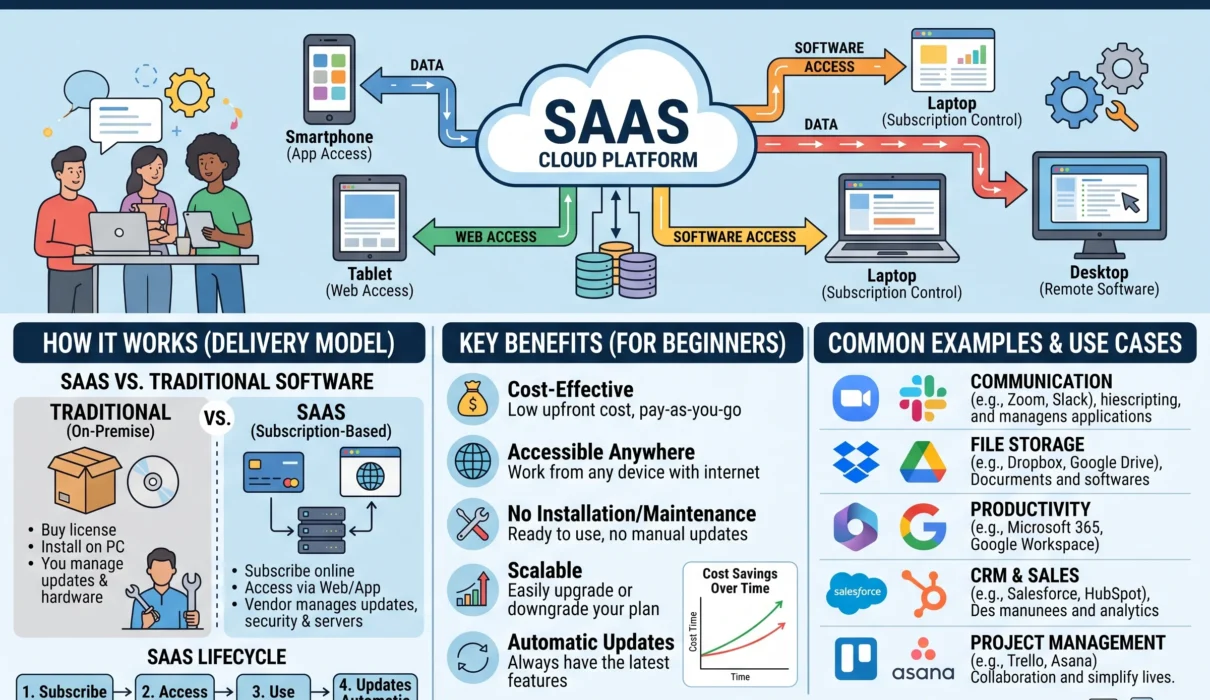
SaaS stands for Software as a Service. It is a cloud-based software delivery model in which a cloud provider hosts applications on central remote servers, manages the underlying infrastructure, and delivers the software to end-users over the internet—typically via a standard web browser, desktop wrapper, or mobile application.
THE EVOLUTION OF SOFTWARE DELIVERY:

TRADITIONAL ON-PREMISES SOFTWARE (Pre-2005):
[ Buy Boxed Disc ] ──► [ Local CD-ROM Install ] ──► [ Manual Patches ] ──► [ Buy Upgrade Disc (V2.0) ]
• High upfront capital expense (perpetual license)
• Tied to a single physical machine
• User responsible for backups, hardware failures, and OS compatibility

MODERN SOFTWARE AS A SERVICE (SaaS):
[ Web Browser / App ] ──► Internet (HTTPS) ──► [ Central Cloud Server & Database ]
• Predictable, ongoing subscription (monthly or annual fee)
• Accessible from any connected device worldwide
• Vendor manages updates, cybersecurity, server scaling, and automated backups
Instead of purchasing a perpetual license to own a static version of software code, you pay an ongoing subscription to access an application that continuously improves. The vendor takes complete responsibility for server maintenance, database storage, system availability, network security, and continuous feature updates.
2. The Cloud Computing Pyramid: SaaS vs. PaaS vs. IaaS
To fully understand SaaS, it helps to see where it fits within the broader cloud computing ecosystem. Cloud computing is historically structured into three core service layers, often referred to as the “Cloud Computing Stack”:
THE CLOUD COMPUTING SERVICE HIERARCHY:

┌────────────────────────────────────────────────────────────────────────┐
│                        SOFTWARE AS A SERVICE (SaaS)                    │
│   Complete end-user applications managed entirely by the vendor.      │
│   Examples: Google Workspace, Salesforce, Zoom, Dropbox, Canva         │
└───────────────────────────────────┬────────────────────────────────────┘
                                    │
                                    ▼
┌────────────────────────────────────────────────────────────────────────┐
│                        PLATFORM AS A SERVICE (PaaS)                    │
│   Development environments & runtimes; developers write code/apps.     │
│   Examples: Heroku, AWS Elastic Beanstalk, Vercel, Google App Engine   │
└───────────────────────────────────┬────────────────────────────────────┘
                                    │
                                    ▼
┌────────────────────────────────────────────────────────────────────────┐
│                      INFRASTRUCTURE AS A SERVICE (IaaS)                │
│   Raw physical compute, virtual machines, networking, and storage.    │
│   Examples: Amazon Web Services (AWS EC2/S3), Microsoft Azure, GCP     │
└────────────────────────────────────────────────────────────────────────┘
The difference between these models comes down to who manages what.
| Management Layer | On-Premises (Traditional) | IaaS (Infrastructure) | PaaS (Platform) | SaaS (Software) |
| Applications | Managed by You | Managed by You | Managed by You | Managed by Vendor |
| Data & Storage | Managed by You | Managed by You | Managed by You | Managed by Vendor |
| Runtime Engine | Managed by You | Managed by You | Managed by Vendor | Managed by Vendor |
| Middleware | Managed by You | Managed by You | Managed by Vendor | Managed by Vendor |
| Operating System | Managed by You | Managed by You | Managed by Vendor | Managed by Vendor |
| Virtualization | Managed by You | Managed by Vendor | Managed by Vendor | Managed by Vendor |
| Physical Servers | Managed by You | Managed by Vendor | Managed by Vendor | Managed by Vendor |
| Storage Hardware | Managed by You | Managed by Vendor | Managed by Vendor | Managed by Vendor |
| Networking | Managed by You | Managed by Vendor | Managed by Vendor | Managed by Vendor |
- IaaS (Infrastructure as a Service): You rent raw virtual servers, hard drives, and network switches from providers like Amazon Web Services (AWS) or Microsoft Azure. You must install the operating system, configure database servers, and manage security patches yourself.
- PaaS (Platform as a Service): The vendor provides a pre-configured execution runtime and framework. Developers bring their own custom application code and databases; the platform automatically handles server scaling, load balancing, and operating system updates.
- SaaS (Software as a Service): The entire application stack is fully assembled, running, and managed by the service provider. As a user or company, you configure settings, import data, and start working immediately.
3. How SaaS Works Under the Hood: Cloud Architecture and Multi-Tenancy
How does a single SaaS provider serve hundreds of thousands—or millions—of individual companies and users simultaneously without data leaking between them? The secret lies in modern cloud architecture and multi-tenancy.
THE MULTI-TENANT SAAS ARCHITECTURE:

[ Customer A (Acme Corp) ]   [ Customer B (Beta LLC) ]   [ Customer C (Zeta Inc) ]
           │                            │                           │
           └────────────────────────────┼───────────────────────────┘
                                        │ (Encrypted HTTPS / API Gateway)
                                        ▼
                   ┌─────────────────────────────────────────┐
                   │       LOAD BALANCERS & WEB SERVERS      │
                   │        (Shared Application Logic)       │
                   └────────────────────┬────────────────────┘
                                        │
                                        ▼
                   ┌─────────────────────────────────────────┐
                   │        SHARED DATABASE CLUSTER          │
                   │                                         │
                   │  [ Tenant A Data ] (Partition Key: A)   │
                   │  [ Tenant B Data ] (Partition Key: B)   │
                   │  [ Tenant C Data ] (Partition Key: C)   │
                   └─────────────────────────────────────────┘
Multi-Tenancy vs. Single-Tenancy
- Multi-Tenant Architecture (The SaaS Standard): In a multi-tenant environment, all customers (called “tenants”) share the same underlying computing infrastructure, application code, and database servers. However, each customer’s data is logically segregated, encrypted, and isolated using unique tenant IDs. Think of it like an apartment building: all residents share the same structural foundation, plumbing, and electrical grid, but each tenant has their own private key to their locked unit.
- Single-Tenant Architecture: The vendor provisions a completely dedicated, isolated instance of the software and database for a single customer. While this offers customized control and satisfies strict legacy compliance requirements, it is significantly more expensive to host, maintain, and upgrade.
Continuous Deployment and Zero-Downtime Updates
In the traditional software era, updating an entire enterprise to a new software release took months of planning, testing, and manual IT deployment.
In a modern SaaS environment, developers deploy code using Continuous Integration and Continuous Deployment (CI/CD) pipelines. Updates, bug fixes, and performance patches are pushed to central cloud servers weekly—or even multiple times a day—without requiring the user to download an update file or restart their computer.
4. The Business Model: How SaaS Monetization Works
SaaS has transformed corporate finance by turning software from a lumpy, unpredictable capital expenditure (CapEx) into a predictable, recurring operating expense (OpEx).
+---------------------------+-----------------------------------+------------------------------------------+
| Pricing Model             | Mechanism                         | Common Real-World Example                |
+---------------------------+-----------------------------------+------------------------------------------+
| **Per-User / Per-Seat**   | Fixed monthly charge per active   | Slack ($8.75/user/mo), Google Workspace, |
|                           | employee account                  | Microsoft 365, Salesforce CRM            |
+---------------------------+-----------------------------------+------------------------------------------+
| **Usage-Based (Consumption)**| Billed on metrics consumed (API  | Snowflake (Compute credits), Twilio (SMS),|
|                           | calls, gigabytes, database rows)  | AWS services, Stripe (Per transaction)   |
+---------------------------+-----------------------------------+------------------------------------------+
| **Tiered Feature Packages**| Bronze, Silver, Gold feature tiers| Mailchimp (Tiered by contacts), HubSpot, |
|                           | based on team size and complexity | Zoom (Free vs. Pro vs. Business tiers)   |
+---------------------------+-----------------------------------+------------------------------------------+
| **Freemium**              | Free basic tier with limitations; | Notion, Canva, Spotify, Trello, Dropbox  |
|                           | premium upgrades for power users  | (Free basic storage, paid expansion)     |
+---------------------------+-----------------------------------+------------------------------------------+
Core Financial Metrics That Define SaaS
Unlike traditional retail businesses evaluated on simple sales volume, software-as-a-service companies run on specific health metrics:
- MRR & ARR (Monthly & Annual Recurring Revenue): The predictable baseline revenue generated by active subscriptions each month or year.
- CAC (Customer Acquisition Cost): The total sales and marketing expenditure required to win a single new paying subscriber.
- LTV (Customer Lifetime Value): The total gross margin a customer generates over the entire duration of their relationship with the business:
$$\text{LTV} = \frac{\text{Average Revenue Per User (ARPU)} \times \text{Gross Margin \%}}{\text{Churn Rate}}$$
- Churn Rate: The percentage of subscribers who cancel their accounts within a given billing cycle. High churn is fatal to a SaaS business, indicating that customers do not find sustained value in the tool.
5. Major Advantages of SaaS
Why has Software as a Service become the default delivery model across virtually every industry vertical? The benefits span cost, accessibility, scalability, and operational focus.
THE CORE PILLARS OF SAAS VALUE:

[ ACCESSIBILITY ] ──► Any device, any location, zero physical installation media
         │
[ AFFORDABILITY ] ──► Low upfront cost; converts heavy CapEx into flexible OpEx
         │
[ SCALABILITY ]   ──► Upgrade from 5 seats to 5,000 seats with a single click
         │
[ COLLABORATION ] ──► Real-time multiplayer editing, shared links, unified truth
1. Low Upfront Capital Costs
Traditional enterprise software often required tens of thousands of dollars in upfront perpetual licensing fees, alongside investments in physical rack-mounted server hardware, uninterruptible power supplies, and dedicated cooling rooms. SaaS eliminates these upfront expenses. Small businesses and startups access enterprise-grade software on Day 1 for low monthly fees.
2. Universal Hardware Independence and Mobility
Because SaaS applications operate via standard web browsers and secure cloud connections, they run seamlessly across Windows, macOS, Linux, iOS, and Android. An employee can start drafting a financial report on an office desktop, review it on a tablet during a flight, and approve team edits via smartphone without manually syncing files.
3. Frictionless Scaling
Growing a business using traditional software required manual IT work: purchasing additional licenses, buying bigger physical hard drives, installing extra server memory, and spending weekends updating machines. With SaaS, scaling is seamless: if your company hires 50 new remote workers, you simply add 50 user licenses in the administrative console; the cloud provider handles the underlying database and server resources instantly.
4. Real-Time Multiplayer Collaboration
SaaS applications operate on centralized, shared cloud databases rather than local files saved to individual desktops. This architecture enables real-time collaboration. Instead of emailing messy file attachments back and forth (Budget_Draft_v2_Final_FINAL.xlsx), multiple team members can edit documents, leave contextual comments, and track revision histories inside a single live workspace simultaneously.
6. Disadvantages, Risks, and Limitations of SaaS
Despite its overwhelming popularity, Software as a Service is not without genuine operational trade-offs, security vulnerabilities, and hidden costs that organizations must navigate.
+---------------------------+-----------------------------------+------------------------------------------+
| Risk Factor               | Practical Operational Problem     | Recommended Mitigation Strategy          |
+---------------------------+-----------------------------------+------------------------------------------+
| **Internet Dependency**   | Outages halt work completely;     | Choose tools offering offline local sync |
|                           | latency impacts real-time actions | (PWA/CRDTs); maintain backup ISP failover|
+---------------------------+-----------------------------------+------------------------------------------+
| **Vendor Lock-In**        | Proprietary data formats make     | Audit export capabilities (JSON/CSV/SQL);|
|                           | migrating to competitors painful  | avoid services without open REST APIs    |
+---------------------------+-----------------------------------+------------------------------------------+
| **Subscription Sprawl**   | Inactive seats and forgotten apps | Conduct quarterly software audits; deploy|
|                           | inflate operational overhead      | centralized SaaS management platforms    |
+---------------------------+-----------------------------------+------------------------------------------+
| **Data Privacy & Breach** | Storing confidential IP on shared | Enforce SSO, multi-factor auth, and zero-|
|                           | third-party servers raises risk   | knowledge encryption standards           |
+---------------------------+-----------------------------------+------------------------------------------+
1. Mandatory Internet Connectivity
The most obvious limitation of cloud software is its dependency on consistent, low-latency broadband internet. If your internet service provider experiences an outage, or if you are working from a remote area without cellular coverage, access to cloud-hosted tools can grind to a halt. While some modern SaaS platforms offer offline caching modes, real-time collaboration and cloud synchronization require an active network connection.
2. Vendor Lock-In and Data Portability
When an organization builds its daily workflows inside a proprietary cloud application for several years, switching to a competitor becomes difficult.
- If the vendor suddenly raises subscription prices, changes service terms, or discontinues critical features, migrating historical data can be challenging.
- Before committing to any SaaS platform, always audit its data export mechanisms: can you easily download your complete, uncorrupted database in open formats like JSON, CSV, or standard SQL dumps?
3. “SaaS Sprawl” and Hidden Costs
While SaaS is inexpensive to start, recurring costs compound over time. As companies grow, individual departments frequently purchase specialized point solutions on corporate credit cards without central IT oversight—a phenomenon known as Shadow IT.
A mid-sized company can end up paying for dozens of overlapping subscriptions, unused licenses, and forgotten accounts, resulting in runaway software budgets that exceed traditional on-premises software costs over a five-year window.
7. Prominent Real-World Examples Across Key Categories
To see the breadth of the SaaS landscape, look at how cloud software has replaced traditional desktop software across major business and consumer categories:
THE MODERN SAAS ECOSYSTEM AT A GLANCE:

[ OFFICE & PRODUCTIVITY ]     Google Workspace  •  Microsoft 365  •  Notion  •  Canva
             │
[ CUSTOMER & SALES (CRM) ]    Salesforce  •  HubSpot  •  Zendesk  •  Intercom
             │
[ TEAM COMMUNICATION ]        Slack  •  Zoom  •  Microsoft Teams  •  Loom
             │
[ FINANCE & ACCOUNTING ]      QuickBooks Online  •  Xero  •  Stripe Dashboard  •  Expensify
             │
[ HUMAN RESOURCES (HRIS) ]    Gusto  •  Rippling  •  BambooHR  •  Workday
- Customer Relationship Management (CRM): Salesforce pioneered the modern SaaS model in 1999 under the marketing banner “The End of Software.” Instead of hosting databases in company basements, sales teams manage leads, pipelines, customer communications, and revenue analytics directly through a browser.
- Office & Document Collaboration: Google Workspace (Docs, Sheets, Slides, Drive) proved that full-featured productivity applications could execute directly inside standard web browsers, eliminating the need to install heavy desktop office suites.
- Creative and Visual Design: Canva and Figma democratized graphic design and user interface prototyping. Rather than requiring high-end graphics workstations, users collaborate on visual assets, vectors, and prototypes in real time on any machine.
- Finance and Accounting: Cloud platforms like QuickBooks Online and Xero link directly to commercial bank feeds, automating bank reconciliations, invoicing, and tax filings while giving external accountants shared financial access.
8. Security, Compliance, and Data Governance in SaaS
When you transition to SaaS, you entrust your sensitive proprietary data, financial records, customer details, and strategic plans to a third-party vendor’s servers. Evaluating software requires understanding security frameworks.
THE ENTERPRISE SAAS SECURITY CHECKLIST:

□ SOC 2 Type II Certification:
  Verifies that an independent auditor validated the vendor's security, availability,
  confidentiality, and processing integrity over an extended observation period.

□ Single Sign-On (SSO) & Multi-Factor Authentication (MFA):
  Enables centralized access management via identity providers (Okta, Azure AD),
  ensuring former employees lose access the moment they leave the company.

□ Encryption at Rest and in Transit:
  Data must be protected using TLS 1.3 during network transmission and AES-256
  encryption when written to physical solid-state drives in cloud data centers.

□ Regulatory Data Sovereignty (GDPR / HIPAA / CCPA):
  Ensures user data complies with local statutory laws, including the right to erasure
  and data residency guarantees inside designated geographic boundaries.
The Shared Responsibility Model
A critical concept in cloud security is the Shared Responsibility Model.
- The SaaS vendor is responsible for securing the cloud infrastructure: patching the operating systems, protecting physical data centers, isolating tenant databases, and preventing denial-of-service attacks.
- The customer is responsible for access governance: enforcing strong passwords, requiring two-factor authentication, managing user permission roles, and preventing employees from exporting sensitive client records onto unsecured personal devices.
9. How to Choose and Implement a SaaS Tool: A Step-by-Step Guide
To avoid subscription waste and adoption headaches, follow this structured four-step evaluation process before subscribing to a new SaaS platform:
1.Audit Real Operational Needs and Redundancies :Step 1: Prevention of Tool Sprawl.
Before evaluating software, document the exact operational problem you are trying to solve. Survey your existing software inventory to ensure another tool your team already pays for does not already include the required feature.
2.Test Integration and API Capabilities :Step 2: Technical Compatibility.
A SaaS tool should not live on an isolated island. Ensure the application provides native integrations or documented REST APIs to communicate with your primary communication hubs, databases, and reporting systems (such as Slack, Google Drive, or your central CRM).
3.Pilot with a Small Test Group :Step 3: User Adoption Validation.
Never roll out a new SaaS platform to an entire company on day one. Run a 14-day or 30-day pilot with three to five core power users. Gather qualitative feedback: Is the user interface intuitive? Does it save time, or does it add manual data entry friction?
4.Enforce Centralized Billing and Periodic Audits :Step 4: Long-Term Financial Governance.
Consolidate all software purchases through a single administrative payment channel rather than scattering expenses across individual employee cards. Establish a recurring quarterly audit to identify and cancel inactive user seats and unused subscriptions.
10. The Future of SaaS: AI Agents, Micro-SaaS, and Vertical Cloud
The SaaS industry is not standing still. Several emerging trends are reshaping the next generation of cloud applications:
THE FUTURE TRAJECTORY OF CLOUD SOFTWARE:

TRADITIONAL SAAS (2010–2024):
• System of Record: Passive database with forms waiting for human data entry
• Horizontal Focus: Broad tools designed to serve every industry generically
• Human Execution: User clicks through dashboards to complete workflows

NEXT-GENERATION SAAS (Current Era & Beyond):
• System of Intelligence: Proactive agentic software that executes tasks autonomously
• Vertical Specialization: Deeply tailored software for specific niche industries
• Outcome-Based Models: Billing based on real business results rather than seat counts
- Agentic AI Integration: Early SaaS tools were passive “systems of record”—they simply stored data you manually typed in. Next-generation SaaS applications act as “systems of action,” using autonomous AI agents to research leads, draft responses, reconcile accounting discrepancies, and run automated marketing campaigns without human intervention.
- Vertical SaaS: Instead of generic horizontal software built for every business (like general project management tools), developers are building Vertical SaaS tailored to specific industries—such as specialized cloud platforms built exclusively for dental practices, commercial construction sites, or auto repair shops.
- Outcome-Based Pricing: As automated agents replace manual software operations, traditional “per-seat” pricing models are coming under pressure. If an AI agent does the work of three employees inside a tool, charging “per human seat” reduces the software vendor’s revenue. As a result, software pricing is shifting toward consumption-based and outcome-based pricing (charging per invoice processed, per support ticket resolved, or per successful transaction).
Summary: The Enduring Impact of Cloud Software
Software as a Service has transformed how software is created, monetized, and consumed around the globe. By removing the financial and technical friction of physical hardware installations, manual updates, and localized licenses, SaaS has leveled the technological playing field. Today, a solo entrepreneur operating from a laptop has access to the exact same enterprise-grade computing power, data analytics, and operational infrastructure as a Fortune 500 corporation.
As the cloud ecosystem matures, understanding how SaaS works—along with its security models, pricing strategies, and integration requirements—is no longer just for software engineers and IT managers. It is a foundational skill for navigating the modern digital economy.
