


 By
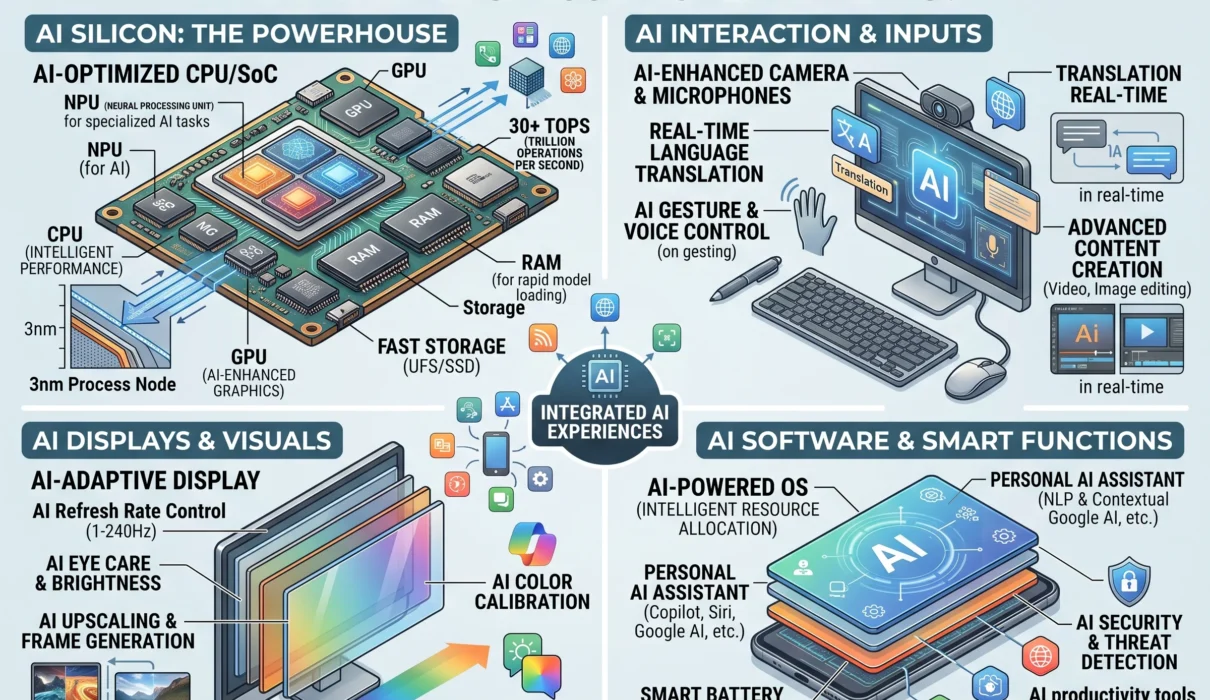
By The personal computer industry is undergoing its most significant structural evolution since the introduction of the dedicated graphics card. For decades, PCs were characterized by a familiar dual-engine dynamic: a Central Processing Unit (CPU) to handle core sequential logic and a Graphics Processing Unit (GPU) to crunch pixel rendering and 3D workloads. Today, that architecture has expanded into a three-pillar foundation with the integration of the Neural Processing Unit (NPU).
The term AI PC is not merely a retail marketing catchphrase; it designates a distinct hardware standard engineered to execute machine learning models and neural inferences locally on the machine. An AI computer does not need to send every text prompt, voice transcription, or visual query across the internet to a centralized server. Instead, an NPU laptop or desktop processes complex cognitive tasks natively on dedicated silicon—delivering instant responsiveness, all-day battery efficiency, and localized privacy.
Understanding what defines an AI laptop requires examining how modern processors divide workloads, what software architectures unlock on-device intelligence, and which hardware specifications genuinely matter before making a purchase.
1. What Defines an AI PC?
At its most fundamental level, an AI PC is a personal computer equipped with a System-on-Chip (SoC) or processor package containing three distinct computational engines: a CPU, a GPU, and a dedicated NPU.
THE THREE-PILLAR COMPUTE ENGINE IN AN AI PC:

┌────────────────────────────────────────────────────────────────────────┐
│                        UNIFIED SYSTEM MEMORY                           │
└──────────────────┬──────────────────┬──────────────────┬───────────────┘
                   │                  │                  │
                   ▼                  ▼                  ▼
          ┌─────────────────┐┌─────────────────┐┌─────────────────┐
          │       CPU       ││       GPU       ││       NPU       │
          │ Sequential Host ││ Parallel Matrix ││ Sustained Low-  │
          │  OS Logic & I/O ││ Heavy Bursts &  ││ Power Neural    │
          │                 ││ 3D Rendering    ││ Inferences      │
          └─────────────────┘└─────────────────┘└─────────────────┘
While any modern computer can technically execute an artificial intelligence model using its CPU or GPU, doing so on conventional hardware creates substantial friction:
- Running a continuous voice transcription model or video background segmentation on a standard CPU pins the processor cores, causing high thermal spikes, loud cooling fan noise, and battery drain.
- Running those same background tasks on a discrete GPU offers high throughput but consumes 30 to 100+ watts of power, draining laptop batteries within an hour or two.
An AI PC solves this problem through specialized offloading. By dedicating low-precision, high-efficiency matrix math to an NPU that operates on a fraction of the power (often between 1.5 and 5 watts), the machine handles background intelligence continuously without interrupting foreground tasks or sacrificing battery life.
2. Under the Hood: CPU vs. GPU vs. NPU
To understand why a dedicated neural engine is necessary, one must look at how computational data flows across different silicon microarchitectures.
+-------------------+----------------------------+-----------------------+------------------------------------------+
| Processor Type    | Core Architecture          | Precision Focus       | Primary AI Role                          |
+-------------------+----------------------------+-----------------------+------------------------------------------+
| **CPU**           | Few complex cores          | FP64, FP32, INT32     | Orchestrates execution, manages system   |
| (Central)         | High clock speeds (4-5GHz) | (General precision)   | state, handles sequential data prep      |
+-------------------+----------------------------+-----------------------+------------------------------------------+
| **GPU**           | Thousands of small cores   | FP32, FP16, TF32      | Massive parallel bursts, large model     |
| (Graphics)        | High memory bandwidth      | (High-throughput float)| training, high-resolution diffusion steps |
+-------------------+----------------------------+-----------------------+------------------------------------------+
| **NPU**           | Arrays of MAC engines      | INT8, INT4, FP8       | Continuous, sustained inference; always- |
| (Neural)          | Tightly coupled cache      | (Quantized integers)  | on sensing; ultra-low power execution    |
+-------------------+----------------------------+-----------------------+------------------------------------------+
The CPU: The Sequential Orchestrator
The CPU remains the director of the operating system. Built with deep branch prediction, massive out-of-order execution pipelines, and high single-core frequencies, it excels at taking complex, linear instructions and executing them rapidly. However, neural networks are not linear; they consist of millions of simultaneous matrix multiplications. A 16-thread CPU quickly stalls when attempting to multiply billion-parameter weight tables in real time.
The GPU: The High-Throughput Powerhouse
Originally designed to calculate 3D geometry and color vectors for millions of screen pixels simultaneously, the GPU is naturally adept at parallel tensor mathematics. When an enthusiast or developer runs a 70-billion-parameter local Large Language Model (LLM) or generates 4K digital artwork via Stable Diffusion, a high-wattage discrete GPU (such as an NVIDIA GeForce RTX or AMD Radeon RX unit) completes the task faster than anything else due to its dedicated, wide-bus VRAM.
The downside is power draw. A discrete graphics card requires high wattage and robust cooling, making it impractical for continuous, lightweight background tasks on a battery-powered laptop.
The NPU: The Efficiency Specialist
The Neural Processing Unit is hardwired exclusively for the fundamental math of neural networks: Multiply-Accumulate (MAC) operations.
$$\text{MAC} = A + (B \times C)$$
A modern NPU contains thousands of MAC units arranged in systolic arrays. Unlike general-purpose processors that continuously fetch instructions and juggle registry caches, systolic arrays stream data through interconnected calculation cells.
- Quantized Math Optimization: NPUs are tuned specifically for low-bit integer calculations (INT8 and INT4). Because pre-trained neural networks can compress mathematical weights from 32-bit floating points down to 4-bit integers with negligible loss in practical accuracy, the NPU can calculate billions of connections using minimal silicon area and power.
- Tightly Coupled Cache: Modern NPUs incorporate dedicated on-die SRAM caches. This architecture allows weight matrices to remain directly on the processor die, reducing the need to pull data across system RAM channels and drastically lowering bus power consumption.
3. Understanding TOPS: The AI Performance Metric
When browsing AI PC specifications, the primary metric highlighted by manufacturers is TOPS—an acronym for Trillions of Operations Per Second (or Tera-Operations Per Second).
INDUSTRY BENCHMARKS & CERTIFICATION THRESHOLDS:

[ Early NPU Generations (10 - 15 TOPS) ]
• Basic webcam effects (Windows Studio Effects, simple background blur)
• Eye contact correction, light noise suppression

[ Copilot+ PC Certification Floor (40+ NPU TOPS) ]
• Real-time on-device Live Captions with multi-language translation
• OS-level semantic search across local files and activity history (Recall)
• Local image co-creation & on-device semantic text editing
• Local quantized 3B to 7B parameter language model residency
What TOPS Actually Measures
One TOPS indicates the capacity to perform one trillion mathematical operations (typically INT8 matrix multiplications) in a single second:
$$\text{TOPS} = \frac{\text{Total MAC Units} \times \text{Operations per Cycle (2)} \times \text{Clock Frequency (GHz)}}{1,000}$$
While TOPS provides a baseline measurement of raw computational throughput, it does not tell the whole story. Real-world AI performance depends heavily on memory bandwidth. An NPU with a high TOPS rating will stall if it cannot stream model parameters out of system RAM quickly enough to sustain its calculation pipeline.
4. On-Device AI vs. Cloud AI: Why Local Processing Matters
Most consumers interact with artificial intelligence via cloud-hosted web interfaces. While massive cloud clusters handle trillions of parameters, relying exclusively on remote data centers presents structural trade-offs that on-device processing solves.
THE ARCHITECTURAL SPLIT:

CLOUD-TIED AI ARCHITECTURE:
[ User Input ]  ──►  Internet (ISP)  ──►  [ Hyperscale Cloud Server ]
                                                   │
                                                   ▼
[ High Latency (300ms - 2s) ] ◄── Data Returned ◄── [ Server Compute & Queues ]
• Subscription-dependent (monthly API / SaaS fees)
• Fails completely when offline
• Corporate data ingestion & privacy vulnerabilities

ON-DEVICE AI PC ARCHITECTURE:
[ User Input ]  ──►  [ Local OS Interconnect ]  ──►  [ On-Die NPU / GPU ]
                                                              │
                                                              ▼
[ Instant Latency (< 30ms) ]  ◄── Local Output   ◄──  [ Hardware Enclave Execution ]
• Operates 100% offline (flights, remote sites)
• Zero recurring subscription costs for local models
• Complete privacy: personal files never leave the SSD
1. Data Privacy and Corporate Governance
When analyzing internal corporate spreadsheets, sensitive legal contracts, or confidential healthcare records, uploading files to public third-party cloud servers can violate regulatory compliance standards (such as HIPAA, GDPR, or corporate NDAs). With an AI PC, documents are parsed by local language models resident in system RAM; the data never leaves the physical computer.
2. Zero-Latency Execution and Offline Availability
Cloud services suffer from network latency, queue wait times, and server downtime. An AI laptop running an on-device speech-to-text model transcribes a live meeting or lecture instantly, without network lag. Whether working inside an airplane cabin or in a remote field location with zero cellular reception, local AI tools remain fully functional.
3. Cost Predictability
Accessing cloud-based multimodal APIs involves recurring monthly subscription tiers or pay-per-token API consumption fees. Local processing shifts AI from an ongoing operational expense to a one-time hardware purchase.
5. Everyday Real-World Applications for AI PCs
Beyond abstract benchmarks, how does an NPU change the daily user experience? AI PCs distribute intelligent processing across several core functional domains:
+-----------------------------+-----------------------------------+------------------------------------------+
| Application Domain          | Specific Feature                  | Hardware Engine Leveraged                |
+-----------------------------+-----------------------------------+------------------------------------------+
| **Collaboration & Video**   | Studio Effects (framing, gaze     | Dedicated NPU (Consumes < 3W power;      |
|                             | correction, voice isolation)      | fans remain silent during long calls)    |
+-----------------------------+-----------------------------------+------------------------------------------+
| **Creative Content**        | Neural smart masking, neural style| Hybrid NPU + GPU (Accelerates rendering  |
|                             | transfer, Super Resolution        | without tying up CPU thread buffers)     |
+-----------------------------+-----------------------------------+------------------------------------------+
| **Software Development**    | Local code completion, on-device  | High-RAM NPU + GPU (Runs open-source     |
|                             | quantized test models             | models like Llama 3 without cloud costs) |
+-----------------------------+-----------------------------------+------------------------------------------+
| **OS Productivity**         | Live Captions with real-time      | NPU (Zero-latency offline transcription  |
|                             | translation, semantic file search | across all audio output streams)         |
+-----------------------------+-----------------------------------+------------------------------------------+
Video Conferencing and Audio Cleanup
In standard video calls, software-based background blurring or noise suppression relies on CPU compute, causing the system to warm up and spinning cooling fans to top speed. On an AI PC, Windows Studio Effects routes background segmentation, automatic camera framing, gaze redirection (making your eyes look directly into the camera lens even when reading notes), and ambient noise suppression exclusively through the NPU. The system remains quiet, cool, and power-efficient throughout multi-hour calls.
Creative Workflows: Photo, Audio, and Video Editing
Major creative suites—including Adobe Creative Cloud, DaVinci Resolve, and Audacity—have updated their underlying engines to target NPU and GPU acceleration:
- Subject Masking: One-click isolation of complex objects, hair strands, and moving elements in video timelines without manual rotoscoping.
- Acoustic Stems Separation: Splitting a recorded music track into separate vocal, drum, bass, and instrument stems in seconds directly within audio software.
- Generative Inpainting: Removing distracting elements from high-resolution photographs and filling the space with context-aware textures locally.
Semantic Search and System-Wide Knowledge Retrieval
Traditional operating system search indexes rely on exact keyword matches; if you search for “tax receipt,” the computer only finds files containing that literal phrase. Modern AI PC frameworks employ local vector embeddings:
- The system evaluates your files, opened web pages, and documents semantically.
- You can search conversational concepts like “Find that blue PDF chart about renewable energy costs from last Tuesday,” and the system identifies the document based on its context, visual contents, and metadata.
6. The AI PC Silicon Ecosystem
The transition toward AI PCs has introduced fierce competition across leading semiconductor designers. The market features three major hardware platforms, alongside Apple’s unified memory architecture.
THE AI PC SILICON LANDSCAPE:

[ QUALCOMM SNAPDRAGON X ELITE / PLUS ]
• Architecture: ARM64 (Custom Oryon CPU cores)
• NPU Rating: 45 TOPS
• Primary Strengths: Class-leading battery endurance, fanless designs, instant wake
• Consideration: Requires ARM-native software or emulation for legacy x86 apps

[ INTEL CORE ULTRA (LUNAR LAKE / ARROW LAKE) ]
• Architecture: x86_64
• NPU Rating: 40 to 48+ TOPS
• Primary Strengths: Complete legacy Windows x86 compatibility, balanced efficiency
• Consideration: Integrated on-package memory limits post-purchase RAM upgrades

[ AMD RYZEN AI (STRIX POINT) ]
• Architecture: x86_64 (Zen 5 CPU + RDNA 3.5 Graphics + XDNA 2 NPU)
• NPU Rating: 50+ TOPS
• Primary Strengths: High multi-threaded CPU output, strong integrated graphics
• Consideration: Higher power draw under combined peak CPU/GPU rendering loads

[ APPLE SILICON (M-SERIES) ]
• Architecture: ARM64 Unified Memory Architecture (UMA)
• Neural Engine: 16-core Apple Neural Engine (ANE)
• Primary Strengths: High memory bandwidth across unified pools up to 128GB+
• Consideration: Operates inside the macOS ecosystem
Qualcomm Snapdragon X Series (The ARM Contender)
Qualcomm’s entrance into the AI PC laptop tier brought ARM architecture into mainstream Windows computing. Featuring custom Oryon CPU cores paired with an Adreno GPU and a Hexagon NPU delivering 45 TOPS, these systems match the battery endurance historically seen only in mobile devices, enabling multi-day productivity on a single charge.
Windows on ARM utilizes a high-efficiency translation layer (Prism) to run traditional x86 applications, though users relying on specialized kernel-level legacy drivers or anti-cheat software should confirm compatibility.
Intel Core Ultra (Lunar Lake and Beyond)
Intel re-engineered its mobile processors to focus on power efficiency. Lunar Lake processors integrate the memory chips directly onto the processor package, eliminating motherboard trace latency and lowering power consumption. With an upgraded NPU reaching 40 to 48 TOPS, paired with efficient Xe2 graphics cores, it delivers native x86 software compatibility with battery life competitive with ARM designs.
AMD Ryzen AI (XDNA 2 Architecture)
AMD’s Ryzen AI platform couples Zen 5 CPU architectures with an XDNA 2 NPU capable of delivering up to 50 TOPS. AMD utilizes a block-floating-point architectural design that allows the NPU to compute 16-bit floating-point accuracy with the speed and memory efficiency of 8-bit integers, providing high throughput for developers and creators.
7. The Consumer AI PC Buying Guide: What to Look For
Purchasing an AI PC requires evaluating hardware beyond standard CPU clock speeds. Use this structured checklist to ensure your investment remains useful over a typical 4-to-6-year lifecycle.
THE ESSENTIAL AI PC HARDWARE SPECIFICATION CHECKLIST:

□ NPU Throughput:
  • Minimum requirement for Windows Copilot+ certification: 40 TOPS
  • Future-proofing target for local multi-agent systems: 45 to 50+ TOPS

□ System RAM (Memory Capacity):
  • 16GB: The absolute operational floor. Accommodates the OS plus a resident 3B model.
  • 32GB: The sweet spot. Allows local execution of quantized 7B to 13B models while multitasking.
  • 64GB+: Essential for developers and local power users running uncompressed models.

□ Memory Bandwidth:
  • Prioritize LPDDR5X-7500 or LPDDR5X-8533. Local inference token speed is bottlenecked
    by memory bus width and speed, not just raw compute TOPS.

□ Storage Capacity:
  • 512GB Minimum / 1TB Preferred. On-device OS models and AI model weights take up
    substantial SSD storage space alongside standard applications.

□ Architecture Verification:
  • Confirm whether your mission-critical professional software runs natively on ARM64
    or requires an x86 (Intel/AMD) platform.
Why RAM is the Real Dividing Line
The most frequent buyer mistake with an AI laptop is purchasing a machine with an exceptional NPU paired with insufficient system memory.
Unlike discrete desktop graphics cards that pack independent, dedicated VRAM, an NPU shares the main system RAM with the operating system, web browser tabs, and background applications.
- A quantized 7-billion parameter language model requires approximately 4GB to 5GB of dedicated RAM just to sit in memory.
- If your laptop only has 16GB of total RAM, loading an on-device model while running video conferencing software, email clients, and browser windows leaves the operating system with minimal breathing room, forcing memory swapping to the solid-state drive and degrading system responsiveness.
- If you intend to run local open-source models (via tools like LM Studio, Ollama, or local Docker containers), prioritize 32GB of RAM over a faster processor clock.
8. Limitations and Common Misconceptions
As with any major technological paradigm shift, consumer expectations must be calibrated against technical realities.
+-----------------------------------+-----------------------------------+
| What an AI PC Does Exceptionally  | What an AI PC Cannot Do           |
+-----------------------------------+-----------------------------------+
| • Runs quiet, low-power background| • Replace a high-end $2,000+      |
|   audio/video neural filters      |   discrete desktop GPU for heavy  |
| • Handles continuous speech-to-   |   commercial AI model training    |
|   text dictation with zero lag    | • Run massive 70B+ parameter      |
| • Operates personal AI assistants |   models without significant RAM  |
|   offline with strict privacy     | • Automatically speed up legacy   |
| • Delivers 15-20+ hours of battery|   software that has not been      |
|   life during active productivity |   compiled with NPU API support   |
+-----------------------------------+-----------------------------------+
The NPU Is Not a High-End Gaming GPU
An NPU is an inference accelerator, not a high-powered 3D rasterization engine. Purchasing an ultra-thin NPU laptop expecting it to replace an NVIDIA GeForce RTX 4080 or 4090 desktop for high-frame-rate 4K gaming or commercial model fine-tuning will lead to disappointment. Serious local training and large-scale visual generation continue to require high-wattage desktop GPUs equipped with fast, dedicated VRAM.
Software Support Takes Time
Hardware always arrives ahead of software optimization. Operating system features (like Windows Studio Effects and Live Captions) utilize the NPU on day one. However, third-party productivity and specialty software require developers to recompile their applications using neural runtime APIs (such as ONNX Runtime, OpenVINO, or DirectML) to route tasks to the NPU. Over time, more independent software vendors are updating their codebases to take advantage of these chips.
Is an AI PC Worth It for You?
Determining whether to purchase an AI PC comes down to your upgrade cycle:
- If you are replacing an aging laptop (3 to 5+ years old): Buying an AI PC is well worth the investment. The price premium for an NPU has largely equalized with standard mobile processors. By selecting an AI PC that meets the 40+ TOPS threshold with at least 16GB (or preferably 32GB) of RAM, you ensure your machine remains compatible with upcoming on-device operating system capabilities, local AI features, and major battery efficiency gains.
- If your current laptop is relatively new and functions well: Upgrading early solely for an NPU is unnecessary for most everyday users. While on-device features are useful, cloud-based tools can handle intermittent AI queries while the local software ecosystem matures.
The AI PC represents a permanent shift in computer engineering. By offloading continuous cognitive tasks to efficient, dedicated silicon, the personal computer is evolving from a passive tool waiting for manual keystrokes into an intelligent, proactive companion that operates quietly, privately, and seamlessly by your side.
