

 By
By For more than six decades, computer security has relied on a shared secret: the password.
Conceived in 1961 by Fernando Corbató at the Massachusetts Institute of Technology (MIT) for the Compatible Time-Sharing System (CTSS), passwords were meant to solve a simple problem: giving multiple researchers isolated, private directories on a shared mainframe. At the time, computers were room-sized machines cordoned off in research laboratories, disconnected from public networks, and accessed by a handful of trusted academics.
Today, that mid-century mechanism protects the global digital economy. The average internet user manages scores of online accounts, and corporate IT departments spend millions attempting to enforce complex password rotation rules.
The results have been disastrous:
- Humans cannot reliably memorize dozens of high-entropy, unique cryptographic strings. In response, they reuse passwords, introduce predictable substitutions (
P@ssw0rd123), write them on physical desk notes, or store them in plaintext files. - Threat actors no longer “break in” by brute-forcing cryptographic algorithms; they simply log in using stolen credentials. Stolen passwords, credential stuffing, adversary-in-the-middle (AiTM) proxy phishing, and infostealer malware logs represent the primary vector of modern enterprise security breaches.
- Traditional Multi-Factor Authentication (MFA)—specifically SMS one-time passwords (OTPs) and mobile push notifications—was introduced as a bandage. Yet these layers remain vulnerable to SIM-swapping, SS7 telecom interception, push notification fatigue, and reverse-proxy phishing kits.
THE EVOLUTIONARY BREAKDOWN OF SHARED SECRETS

1960s: Local Mainframe ──► Single Plaintext Password ──► (Low Risk, Air-Gapped)
                           │
1990s: Web Commercialization ──► Passwords Across Databases ──► (Breaches & Cracking)
                                  │
2010s: Legacy MFA Bandage ──► Password + SMS/Push OTP ──► (Phishing Proxies, SIM-Swaps)
                              │
TODAY: MODERN AUTHENTICATION ──► ZERO SHARED SECRETS ──► (Cryptographic Proof)
                                  • Passkeys (FIDO2 / WebAuthn)
                                  • On-Device Biometrics
                                  • Hardware Security Keys (YubiKeys)
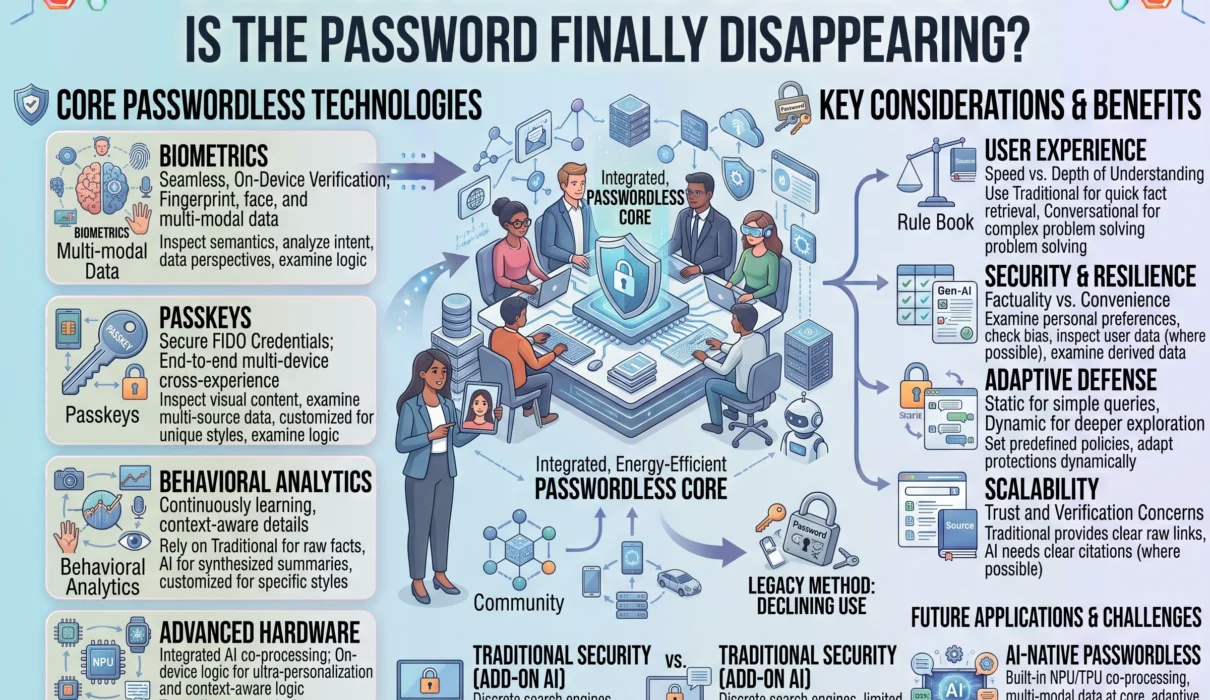
The computing industry is executing its most significant architectural shift in authentication history: passwordless authentication.
Driven by the FIDO Alliance, the World Wide Web Consortium (W3C), and platform leaders like Apple, Google, and Microsoft, passwordless systems discard shared secrets entirely. Instead, they rely on asymmetric public-key cryptography, hardware security enclaves, on-device biometrics, and physical security keys.
Is the password finally disappearing? The answer is nuanced: while passwords will not vanish overnight from legacy mainframes and internal enterprise tools, the password as the primary gatekeeper of global online security has reached its functional end.
1. What Is Passwordless Authentication?
To understand passwordless technology, we must first define what it is not.
Passwordless authentication is not merely a password manager auto-filling a stored text string into an input box. It is not an SMS verification code, nor is it a magic email link (which simply shifts the authentication burden onto the password protecting your email inbox).
True passwordless authentication is a system where no shared secret is ever created, transmitted over a network, or stored on an external server.
SHARED SECRET AUTHENTICATION (The Flawed Legacy Model):
[User Device] ═══════ Plaintext / Hash over Network ═══════► [Server Database]
                         (Intercepted via Phishing)              (Compromised via Breach)

ASYMMETRIC CRYPTOGRAPHIC AUTHENTICATION (Passwordless):
┌───────────────────────────┐                 ┌───────────────────────────┐
│ CLIENT DEVICE             │                 │ RELYING PARTY (Server)    │
│ • Secure Enclave / TPM    │                 │ • Holds Public Key ONLY   │
│ • Holds PRIVATE KEY       │                 │ • Public key is useless   │
│ • Never leaves the chip   │                 │   to an attacker          │
└─────────────┬─────────────┘                 └─────────────┬─────────────┘
              │                                             │
              │ 1. Authentication Request                   │
              ├────────────────────────────────────────────►│
              │                                             │
              │ 2. Cryptographic Challenge (Random Nonce)   │
              │◄────────────────────────────────────────────┤
              │                                             │
   [Local Biometric Verify]                                 │
   (Fingerprint / Face ID)                                  │
              │                                             │
              │ 3. Signed Challenge (Digital Signature)     │
              ├────────────────────────────────────────────►│
              │                                             │
              │                               [Verifies Signature]
              │                               [Grants Access]
              │ 4. Session Authenticated                    │
              │◄────────────────────────────────────────────┤
The Three Authentication Factors
Classic computer security defines three fundamental authentication factors:
- Something You Know: A password, PIN, passphrase, or mother’s maiden name.
- Something You Have: A physical smartphone, hardware security key, smart card, or cryptographic authenticator.
- Something You Are: Biometric markers—a fingerprint, facial geometry scan, or iris profile.
Legacy systems relied almost exclusively on “Something You Know.” The fatal flaw of this factor is that once a secret is known, it can be shared, guessed, coerced, stolen, or intercepted across the internet.
Modern authentication technology combines “Something You Have” (a hardware device storing a non-exportable cryptographic private key) with “Something You Are” (local biometric verification to authorize that hardware to sign a challenge) in a single, friction-free step.
2. Passkeys Explained: The Gold Standard of Modern Authentication
The core technology driving the passwordless transition is the passkey.
A passkey is a digital credential built on the open FIDO2 and WebAuthn standards. Created through collaboration between the FIDO (Fast IDentity Online) Alliance and the W3C, passkeys replace passwords with asymmetric public-key cryptography natively integrated into operating systems, browsers, and mobile hardware.
┌────────────────────────────────────────────────────────────────────────┐
│                   THE ARCHITECTURAL PILLARS OF FIDO2                   │
├───────────────────────────────────┬────────────────────────────────────┤
│ WebAuthn (Web Authentication API) │ CTAP (Client to Authenticator)     │
├───────────────────────────────────┼────────────────────────────────────┤
│ • W3C standard JavaScript API     │ • FIDO Alliance protocol           │
│ • Embedded inside web browsers    │ • Enables external authenticators  │
│   (Chrome, Safari, Edge, Firefox) │   (USB keys, Bluetooth, NFC mobile)│
│ • Allows web apps to request      │   to talk directly to client PCs   │
│   cryptographic assertions        │   and mobile operating systems     │
└───────────────────────────────────┴────────────────────────────────────┘
The Registration Flow: How a Passkey Is Born
When you create an account or upgrade an existing service to use a passkey:
- Key Generation: Your client device (e.g., an iPhone, Android device, MacBook, or Windows PC) uses its local cryptographic processor to generate an asymmetric key pair: a private key and a public key.
- Private Key Isolation: The private key remains locked inside the device’s hardware-backed Secure Enclave or Trusted Platform Module (TPM). It is mathematically unexportable and cannot be extracted over a network.
- Public Key Registration: The client transmits the public key across the internet to the service provider (the “Relying Party”). The server stores the public key in its database associated with your account.
Even if a malicious actor completely breaches the service provider’s database, stolen public keys are useless. A public key can only verify signatures; it cannot forge them.
The Authentication Flow: The Cryptographic Challenge
When you log in to that service in the future:
- The Challenge: You navigate to the website or app. The server generates a unique, one-time cryptographic challenge (a high-entropy random string known as a “nonce”) and sends it to your browser.
- Local User Verification: The browser invokes the WebAuthn API, prompting your operating system to verify your identity. You place your finger on the sensor, look at the front-facing camera, or enter your local device lock code.
- Cryptographic Signing: Once local verification succeeds, the Secure Enclave uses the stored private key to mathematically sign the server’s challenge.
- Verification: The client returns the digital signature to the server. The server uses your previously stored public key to verify that the signature was generated by the corresponding private key. If the signature matches, the server grants access.
No password crossed the network. No shared secret was typed into an input box. Nothing exists on the server that an attacker can steal to impersonate you on another system.
3. Why Passkeys Are Truly Phishing-Resistant: The Origin-Binding Mechanism
The term “phishing-resistant” is often used loosely in cybersecurity marketing, but in the context of FIDO2/WebAuthn, it is a mathematically verifiable architectural guarantee.
                     THE ANATOMY OF A MITM PHISHING ATTACK

  LEGACY PASSWORD + OTP ATTACK:
  [Victim] ──► [Phishing Site: evil-bank.com] ──► [Real Site: bank.com]
               • Enters password "Secret123"      • Attacker passes password
               • Enters 6-digit SMS code          • Attacker passes SMS code
               • VICTIM COMPROMISED               • ATTACKER GAINS ACCESS TOKEN

  PASSKEY ORIGIN-BINDING DEFENSE:
  [Victim] ──► [Phishing Site: evil-bank.com] ──► [Real Site: bank.com]
               • Browser intercepts WebAuthn call
               • Browser checks URL in address bar: "evil-bank.com"
               • Queries Secure Enclave for keys bound to "evil-bank.com"
               • NO PASSKEY FOUND (Keys are bound strictly to "bank.com")
               • The cryptographic handshake REFUSES to execute
               • ATTACK FAILS INSTANTANEOUSLY
The Failure of Traditional MFA Against Reverse Proxies
Modern phishing attacks do not rely on crude email forms. Attackers deploy open-source reverse-proxy kits like Evilginx and Modlishka.
These proxies sit between the victim and the legitimate service:
- The victim clicks a malicious link and lands on a visually identical proxy domain (
login.micros0ft.com). - The victim types their username and password. The proxy passes those credentials directly to the real Microsoft server in real time.
- The real server issues a multi-factor authentication prompt (an SMS code, an authenticator app TOTP code, or a push approval).
- The proxy displays that prompt to the victim. The victim enters the code, the proxy forwards it to the real server, and the real server returns an authenticated session cookie.
- The proxy intercepts and copies the session cookie, giving the attacker full, persistent access to the account—bypassing legacy MFA entirely.
The Cryptographic Shield: Origin Binding
Passkeys eliminate reverse-proxy phishing through Origin Binding.
When a website triggers the WebAuthn API to request an authentication assertion, the web browser directly introspects the cryptographic Fully Qualified Domain Name (FQDN) in the address bar. The browser packages this origin (e.g., [https://accounts.google.com](https://accounts.google.com)) directly into the cryptographic payload presented to the device’s Secure Enclave.
The authenticator will only sign the challenge if the origin provided by the browser matches the exact domain encoded into the passkey during registration.
If an attacker lures a user to [https://accounts.goog1e-login.com](https://accounts.goog1e-login.com), the browser passes that spoofed domain to the authenticator. The authenticator checks its internal storage, determines that it holds no private key bound to accounts.goog1e-login.com, and halts the handshake.
Even if the user is completely deceived by the fraudulent page, the underlying cryptography refuses to sign the payload. The human is removed from the verification loop.
4. Synced Passkeys vs. Device-Bound Passkeys
Not all passkeys operate identically. The FIDO ecosystem distinguishes between two primary implementations: multi-device credentials (synced passkeys) and single-device credentials (device-bound passkeys).
┌────────────────────────────────────────────────────────────────────────┐
│                   SYNCED vs. DEVICE-BOUND PASSKEYS                     │
├─────────────────────┬────────────────────┬─────────────────────────────┤
│ Architectural Layer │ Synced Passkeys    │ Device-Bound Passkeys       │
│                     │ (Multi-Device)     │ (Hardware-Bound)            │
├─────────────────────┼────────────────────┼─────────────────────────────┤
│ Storage Medium      │ Encrypted cloud    │ Physical secure element     │
│                     │ keychain sync      │ (YubiKey, Nitrokey,         │
│                     │ (Apple, Google, MS)│ Dedicated HSM, Smart Card)  │
├─────────────────────┼────────────────────┼─────────────────────────────┤
│ Key Portability     │ Syncs automatically│ Non-exportable; physically  │
│                     │ across platforms   │ tethered to a single token  │
├─────────────────────┼────────────────────┼─────────────────────────────┤
│ Recovery Model      │ Account recovery   │ Secondary backup hardware   │
│                     │ via cloud escrow   │ key enrolled in account     │
├─────────────────────┼────────────────────┼─────────────────────────────┤
│ Attestation Cap     │ Basic platform     │ Full hardware attestation   │
│                     │ attestation        │ (FIPS 140-3 validation)     │
├─────────────────────┼────────────────────┼─────────────────────────────┤
│ Target Environment  │ Mass consumer web, │ High-assurance enterprise,  │
│                     │ banking, retail, ecom│ defense, privileged admin │
└─────────────────────┴────────────────────┴─────────────────────────────┘
Synced Passkeys (The Consumer Experience)
The greatest hurdle to early public-key cryptography was key recovery: What happens when a user drops their smartphone in the ocean? If the private key was locked exclusively inside that physical phone, the user was permanently locked out of their accounts.
Synced passkeys solve this through cloud-escrowed key synchronization:
- Major platform vendors (Apple via iCloud Keychain, Google via Google Password Manager, and Microsoft via Windows Hello / Entra ID) synchronize encrypted passkeys across a user’s registered devices.
- When you create a passkey on your iPhone, it syncs end-to-end encrypted to your iPad and MacBook.
- The synchronization pipeline is guarded by zero-knowledge encryption: the platform provider does not hold the decryption keys and cannot read or sign assertions with your passkeys.
- If you lose your phone, purchasing a new device and authenticating through platform cloud recovery restores your entire passkey keychain automatically.
Device-Bound Passkeys (The Enterprise & High-Assurance Standard)
For high-risk environments—such as infrastructure engineers managing production cloud environments, corporate financial officers, and defense personnel—synced credentials introduce a compliance challenge: the private key leaves the physical device.
Device-bound passkeys (also known as hardware-bound passkeys) store private keys on dedicated physical hardware authenticators, such as Yubico YubiKeys:
- The private key is burned into the physical secure element and can never be duplicated, exported, or synchronized to cloud storage.
- Device-bound keys support Cryptographic Attestation: during registration, the hardware key presents an X.509 certificate cryptographically signed by the hardware manufacturer. This allows an enterprise Relying Party to verify that the passkey was created on a certified, tamper-resistant FIPS-compliant hardware token rather than a virtualized machine or smartphone.
5. Biometrics and Hardware Security Keys: The Physical Anchors
Passwordless authentication relies heavily on biometrics and physical security tokens. However, the role these components play in the architecture is frequently misunderstood.
THE PRIVACY-PRESERVING BIOMETRIC ISOLATION MODEL

Web Application / Remote Server:
❌ NEVER SEES YOUR FINGERPRINT
❌ NEVER RECEIVES YOUR FACIAL SCAN DATA
❌ NEVER PROCESSES RAW BIOMETRIC ARRAYS

Local Hardware (Secure Enclave / TPM):
┌────────────────────────────────────────────────────────────────────────┐
│ ISOLATED HARDWARE PERIMETER                                            │
│                                                                        │
│ [Camera / Sensor] ──► [Biometric Math Match] ──► Match Confirmed?      │
│                                                          │             │
│                                                          ▼             │
│                                                [Unlocks Private Key]   │
│                                                [Signs Challenge Nonce] │
└────────────────────────────────────────────────────────────────────────┘
The Biometric Privacy Fallacy
A common user objection to passwordless technology is: “I do not want dozens of websites and commercial corporations to store my biometric data.”
In modern FIDO2/WebAuthn architectures, biometric data is never transmitted across the network, never stored in a central database, and never visible to the website you are logging into.
- Biometric verification is entirely a local gatekeeper.
- When you scan your face via Apple Face ID or touch a fingerprint sensor on a Windows Hello or Android device, the biometric hardware evaluates the mathematical representation locally inside the silicon.
- If the scan matches the locally stored template, the Secure Enclave simply flips an internal cryptographic bit: User verified.
- The hardware then uses the private key to sign the server’s challenge. The website receives only a mathematical signature: a string of numbers confirming that the local authorization succeeded.
If a company you do business with suffers a total infrastructure breach, your biometric identity remains completely safe because they never had it.
Hardware Security Keys: The Physical Roots of Trust
For pure physical defense, dedicated hardware security keys (such as YubiKeys or Nitrokeys) provide the highest assurance level in digital identity (NIST SP 800-63B AAL3).
┌────────────────────────────────────────────────────────┐
│               HARDWARE SECURITY KEY TOPOLOGY           │
├────────────────────────────────────────────────────────┤
│ • USB-A / USB-C / NFC Interfaces                       │
├────────────────────────────────────────────────────────┤
│ • Secure Element (CC EAL6+ Certified Chip)             │
│   Stores private key arrays in physically shielded     │
│   silicon layers resistant to electron-microscope probes│
├────────────────────────────────────────────────────────┤
│ • Physical Capacitive Touch Sensor                     │
│   Mandates user presence; verifies an electrical       │
│   circuit closed by a human finger to block malware   │
└────────────────────────────────────────────────────────┘
Hardware security keys communicate with host devices via CTAP2 (Client to Authenticator Protocol 2).
Crucially, they require a physical User Presence test: a capacitive touch sensor on the key’s chassis. Even if an adversary deploys advanced kernel-level malware on your workstation, the malware cannot force the security key to sign an authentication request.
The physical token demands that a human finger touch the copper contacts to complete the electrical circuit, executing the cryptographic assertion.
6. Real-World Business Outcomes: Security Meets User Experience
Historically, computer security and user experience existed in direct opposition: making a system more secure inevitably made it more cumbersome for humans to use. Complex password requirements (14 characters, uppercase, lowercase, numbers, symbols, monthly expiration) frustrated employees and led to massive operational friction.
Passwordless authentication is one of the few paradigms in enterprise computing where security improves by orders of magnitude while login friction decreases.
┌────────────────────────────────────────────────────────────────────────┐
│                   PASSWORDS vs. PASSKEYS: PERFORMANCE BENCHMARKS       │
├─────────────────────┬────────────────────┬─────────────────────────────┤
│ Metric Benchmark    │ Traditional        │ FIDO2 Passkey               │
│                     │ Password + MFA     │ Authentication              │
├─────────────────────┼────────────────────┼─────────────────────────────┤
│ Average Sign-In     │ ~31.2 seconds      │ ~8.5 seconds                │
│ Velocity            │ (Typing + OTP SMS) │ (Biometric touch) [1]       │
├─────────────────────┼────────────────────┼─────────────────────────────┤
│ Authentication      │ ~63%               │ ~93%                        │
│ Success Rate        │ (Forgotten pass,   │ (Frictionless local         │
│                     │  typos, OTP delays)│  hardware handshake) [1]    │
├─────────────────────┼────────────────────┼─────────────────────────────┤
│ IT Helpdesk Burden  │ 30% to 50% of all  │ Reduced by up to 80%+       │
│                     │ tickets are resets │ (Eliminates reset workflows)│
├─────────────────────┼────────────────────┼─────────────────────────────┤
│ Phishing            │ Vulnerable to AiTM │ Cryptographically immune    │
│ Vulnerability       │ reverse proxies    │ via Origin Binding [2]      │
└─────────────────────┴────────────────────┴─────────────────────────────┘
[1] FIDO Alliance Consumer Authentication Benchmark Data.
[2] NIST Special Publication 800-63B Digital Identity Guidelines.
1. Eliminating IT Helpdesk Password Resets
According to Gartner, password resets account for 20% to 50% of all enterprise IT helpdesk tickets, with an average labor cost of $70 per single reset incident.
When organizations transition their workforce to passwordless authentication via Windows Hello for Business or FIDO2 hardware tokens, password-related support tickets decline by up to 80%, redirecting IT engineering resources to core technical infrastructure.
2. Sashing E-Commerce Cart Abandonment
In consumer applications, login friction directly destroys revenue. When a returning shopper encounters a forgotten password gate on a mobile checkout screen, conversion rates plummet.
Companies deploying passkeys report a 30% higher sign-in success rate and an average sign-in speed improvement from over thirty seconds down to under nine seconds.
Shoppers authenticate with the same Face ID or fingerprint scan they use to unlock their phone, removing checkout friction.
7. The Roadblocks: Why Haven’t Passwords Disappeared Yet?
If the mathematical and operational arguments for passwordless authentication are so decisive, why are passwords still ubiquitous across the internet?
The challenge is not cryptographic; it is systemic and operational.
                    THE FOUR ROADBLOCKS TO FULL ADOPTION

     Cross-Ecosystem Synchronization             Legacy Infrastructure
    ┌───────────────────────────┐               ┌───────────────────────────┐
    │ Syncing passkeys between  │               │ Mainframes, RADIUS, and   │
    │ Apple, Google, & Windows  │ ────────────► │ ancient protocols rely on │
    │ ecosystems remains messy. │               │ static text password bars.│
    └───────────────────────────┘               └───────────────────────────┘
                                 │
                                 ▼
                     Account Recovery & Shared Accounts
                    ┌────────────────────────────┐
                    │ How do corporate teams     │
                    │ share social media logins  │
                    │ without shared passwords?  │
                    └────────────────────────────┘
1. The Cross-Platform Synchronization Challenge
While passkeys synchronize within a single vendor’s ecosystem (e.g., across an iPhone, iPad, and Mac via iCloud Keychain), moving credentials across competing operating systems historically introduced friction:
- If a user generates a passkey on an iPhone and later attempts to log in on a Windows desktop via Chrome, they must use a cross-device flow: the Windows browser displays a QR code, which the user scans with their iPhone camera to bridge a Bluetooth link.
- While the FIDO Alliance introduced secure credential exchange protocols (allowing third-party password managers like 1Password, Bitwarden, and Dashlane to sync passkeys across any platform), native ecosystem interoperability is still maturing.
2. Legacy Infrastructure and Protocol Incompatibilities
The enterprise software landscape is filled with legacy systems: Linux SSH terminal sessions, database connection strings, custom command-line utilities, RADIUS servers, and decades-old enterprise resource planning (ERP) mainframes.
These protocols were hardcoded around static strings.
You cannot prompt a thirty-year-old terminal utility running in a headless server room for a WebAuthn browser assertion without building complex modernization proxy layers.
3. Shared Corporate Accounts and Privileged Access
In business environments, teams routinely share access to corporate social media channels, emergency administrative root consoles, and third-party vendor dashboards.
Traditional password managers handled this by sharing stored text strings.
Passkeys—tied to physical devices or specific user identity stores—complicate shared access workflows. Organizations must deploy advanced enterprise identity governance platforms or next-generation password managers that support secure cryptographic delegation of passkeys between authorized team members.
4. Account Recovery Vulnerabilities
The overall security of any passwordless account is only as robust as its fallback recovery mechanism.
If a website implements a flawless, phishing-resistant passkey login flow, but includes a button below it reading: “Lost your passkey? Click here to receive a 6-digit recovery code via SMS”, the account remains completely vulnerable to legacy attacks.
Attackers will simply target the weaker recovery vector via SIM-swapping or telecom interception. Building secure, phishing-resistant account recovery that does not rely on shared secrets remains one of the hardest design challenges in modern identity architecture.
8. Strategic Blueprint: How Organizations Can Transition to Passwordless
Transitioning an enterprise to passwordless security cannot be executed overnight. A successful migration follows a phased rollout model that modernizes identity infrastructure systematically while protecting business continuity.
┌────────────────────────────────────────────────────────────────────────┐
│               ENTERPRISE PASSWORDLESS ROADMAP MATRIX                   │
├─────────────────────┬──────────────────────────────────────────────────┤
│ Strategic Horizon   │ Tactical Operational Deliverable                 │
├─────────────────────┼──────────────────────────────────────────────────┤
│ Phase 1: Identity & │ Consolidate directories into a modern Cloud IdP  │
│ Credential Audit    │ (Entra ID, Okta); deprecate SMS and voice-call   │
│ (Months 1–3)        │ MFA across all systems in favor of TOTP/FIDO.   │
├─────────────────────┼──────────────────────────────────────────────────┤
│ Phase 2: Endpoint   │ Enable Windows Hello for Business and Apple      │
│ Modernization       │ Touch ID/Platform SSO for primary corporate      │
│ (Months 4–6)        │ workstation unlocks and single-sign-on (SSO).    │
├─────────────────────┼──────────────────────────────────────────────────┤
│ Phase 3: Hardware   │ Distribute FIDO2 hardware security keys          │
│ Keys for Privileged │ (YubiKeys) to developers, IT administrators, and │
│ Users (Months 7–9)  │ finance personnel; enforce strict AAL3 controls. │
├─────────────────────┼──────────────────────────────────────────────────┤
│ Phase 4: Customer-  │ Implement WebAuthn passkey registration on your  │
│ Facing Deployment   │ consumer-facing web portals and mobile apps;     │
│ (Months 10+)        │ demote passwords to a secondary fallback flow.   │
└─────────────────────┴──────────────────────────────────────────────────┘
Step 1: Upgrade Identity Infrastructure First
Do not attempt to deploy passkeys on fragmented, legacy directory services. Modernize your Identity and Access Management (IAM) layer:
- Migrate on-premises Active Directory trees to modern cloud identity providers (such as Microsoft Entra ID or Okta) that support native FIDO2 authentication and Conditional Access policies.
- Eliminate legacy authentication protocols (like NTLM and basic authentication) that bypass modern identity evaluations.
Step 2: Roll Out Platform Authenticator Unlocks
Begin with your internal workforce:
- Enable Windows Hello for Business across your enterprise Windows fleet and Platform Single Sign-On (Platform SSO) across macOS endpoints.
- Employees unlock their laptops using their local face, fingerprint, or hardware-bound PIN, which automatically exchanges an encrypted cryptographic token with the identity provider.
- The worker enters zero passwords throughout their entire workday, experiencing the convenience of passwordless access immediately.
Step 3: Implement Phishing-Resistant MFA for Privileged Users
Before rolling out passkeys to millions of external customers, protect your most critical internal access paths:
- Mandate device-bound FIDO2 hardware security keys for systems engineers, database administrators, and executive leadership.
- Configure Conditional Access policies in your identity provider: require a FIDO2 hardware assertion to access production AWS consoles, GitHub repositories, and corporate banking platforms.
Step 4: Deploy WebAuthn to Consumer Workflows
When introducing passkeys to consumer-facing applications, adopt an intuitive user experience:
- Do Not Force an Abrupt Switch: Allow users to enroll passkeys alongside their existing password credentials.
- Promote Passkeys Post-Login: When a user logs in successfully via their legacy password, present a contextual prompt: “Next time, log in instantly with Face ID / Fingerprint. Create a passkey.”
- Demote the Password Field: Once a passkey is registered, make it the default interaction. Hide the password input behind a secondary link: “Sign in with a password instead.”
The Verdict: The Beginning of the Post-Password Era
Is the password finally disappearing?
Yes—not in a sudden, overnight wave, but in a steady, irreversible architectural transition.
For sixty years, computing relied on shared text strings because our hardware, networks, and algorithms were too primitive to support anything else. We asked human beings to behave like cryptographic databases, memorizing strings of characters, and punished them when their biological brains predictably failed.
The rise of asymmetric public-key cryptography, dedicated Secure Enclaves in consumer silicon, unified WebAuthn browser standards, and phishing-resistant passkeys has fundamentally changed computing security.
Passwords are being steadily demoted from their position as the primary gatekeeper of human identity. They are becoming an emergency, secondary fallback—destined to join punch cards, floppy disks, and dial-up tones as relics of computing history.
The future of digital security does not require stronger passwords, more complex symbols, or frequent reset prompts. The future of security is having no passwords at all.